Light vs Dark Wood Veneer: A Complete Guide to Texture, Aesthetics, and Applications
By Mira Kapoor | 20 April 2026 | 10 mins read
Table of contents
Table of Contents
You can design a well-proportioned space or product, but if the surface treatment is off, the entire experience feels unbalanced. In many cases, the issue comes down to material perception, and wood veneer texture plays a critical role in how a design is seen, felt, and understood.
Choosing between light and dark wood veneer isn’t just an aesthetic preference. It directly influences spatial perception, lighting behavior, and emotional tone. Light veneers can make environments feel open and calm, while dark veneers introduce depth, contrast, and a sense of visual weight. The same design, with a different veneer, can communicate something entirely different.
This guide breaks down the practical differences between light and dark wood veneer textures, helping you understand when and where to use each. Whether you're working on interiors, products, or digital renders, the goal is to make more intentional material decisions that enhance both function and atmosphere.
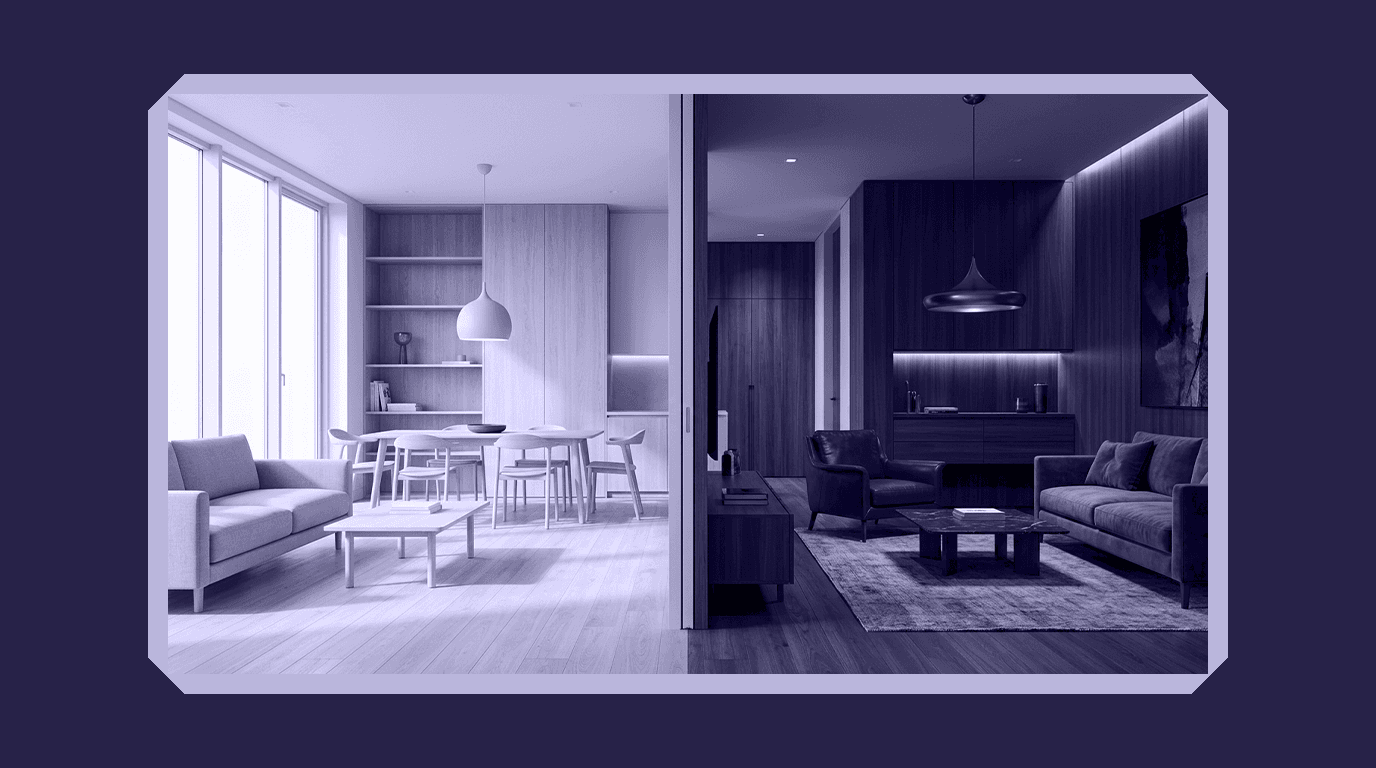
Understanding wood veneer textures as a design foundation
Before comparing light and dark veneers, it’s important to understand what a wood veneer texture actually represents in a design workflow. It’s not just a surface finish; it’s a combination of grain structure, tone, reflectivity, and pattern that defines how a material behaves visually under different conditions. Whether applied physically or used as a digital texture, veneer becomes the primary layer through which users interpret quality, scale, and realism.
What defines a wood veneer texture in modern design workflows?
A wood veneer texture is essentially a thin slice of real wood applied to a substrate, but from a design perspective, it’s a controlled representation of natural material characteristics. What matters isn’t just the species, but how the veneer is cut (plain-sliced, quarter-sawn, rotary), how consistent the grain is, and how the surface is finished.
In digital environments, especially in PBR (Physically Based Rendering) workflows, this expands further. A veneer texture is no longer just an image; it includes multiple maps like albedo (color), roughness, and normal maps that define how light interacts with the surface. This is where the difference between a flat-looking material and a photorealistic one becomes obvious.
How grain, tone, and finish influence visual perception
Three variables drive how a wood veneer is perceived:
- Grain pattern: Linear grains tend to feel structured and modern, while irregular or cathedral grains feel more organic and expressive. Grain scale also matters; large patterns can dominate a surface, while finer grains create subtlety.
- Tone (light vs. dark): This directly impacts brightness and contrast. Lighter tones reflect more light and reduce visual density, while darker tones absorb light and add visual weight.
- Finish: Matte finishes diffuse light and feel soft and natural, whereas glossy finishes increase reflectivity and highlight grain contrast. The same veneer can feel completely different depending on its finish.
These elements don’t work in isolation; they interact with lighting, surrounding materials, and scale. That’s why a veneer that looks perfect in isolation can behave very differently once applied in a real environment.
Natural vs. engineered veneers in digital and physical applications
Another important distinction is between natural and engineered veneers. Natural veneers preserve the randomness of real wood, including variations in grain and tone. This makes them visually rich but less predictable. Engineered veneers, on the other hand, are designed for consistency, uniform grain patterns, controlled color, and repeatability across surfaces.
In physical products, engineered veneers are often preferred for scalability and consistency. In digital design, however, both types require careful handling. Natural veneers need variation control to avoid visual noise, while engineered veneers must avoid looking too repetitive or artificial when tiled across large surfaces.
Understanding these fundamentals is critical because the choice between light and dark veneer isn’t just about color; it’s about how all these variables come together to shape perception. With that foundation in place, we can now look at how light wood veneers behave in real design scenarios.
Light wood veneer textures: Expanding space and softening environments
Light wood veneers are often the default choice in modern design, and for good reason. They introduce brightness, reduce visual density, and make spaces feel more open. But their effectiveness isn’t just about being light; it comes from how they interact with light, scale, and surrounding materials.
What makes light wood textures visually effective?
Light veneers, such as oak, ash, maple, or birch, have higher reflectance values. This means they bounce more light back into the environment, increasing overall brightness and reducing contrast. The result is a softer, more uniform visual field that feels calm and approachable.
They also tend to minimize visual interruptions. Because the tonal variation is subtle, grain patterns appear less aggressive, allowing the eye to move smoothly across surfaces. This is especially useful in designs where continuity and flow are important, such as large wall panels, cabinetry, or seamless product surfaces.
Best use cases for light wood veneers in interiors and product design
Light wood textures perform best in scenarios where spatial expansion and clarity are priorities:
- Compact interiors: Small rooms or apartments benefit from light veneers because they reflect available light and make the space feel larger than it is.
- Scandinavian and minimal design systems: These styles rely on simplicity, neutrality, and natural light; light wood becomes a foundational material.
- Retail and e-commerce environments: Products displayed against light wood backgrounds feel more accessible and less visually heavy.
- Furniture and consumer products: Light veneers communicate approachability, modernity, and ease of use.
In digital rendering, light wood is also more forgiving. Minor imperfections in texture resolution or mapping are less noticeable compared to darker materials.
Popular light wood types and their texture characteristics
Each light wood type brings its own texture behavior:
- Oak (light): Visible grain with a balanced pattern, versatile and widely used.
- Ash: Straighter, more linear grain, clean and contemporary.
- Maple: Fine, subtle grain, ideal for smooth, minimal surfaces.
- Birch: Uniform and soft, works well for large, uninterrupted areas.
The choice depends on how much grain visibility you want. More visible grain adds character, while finer grain leans toward minimalism.
When light textures fail: limitations and overuse scenarios
Despite their advantages, light veneers aren’t universally effective. Overuse can lead to environments that feel flat, washed out, or lacking in contrast. Without darker elements to anchor the design, everything can blend together, reducing visual hierarchy.
They can also struggle in high-contrast lighting conditions. In very bright environments, light wood may lose definition, making surfaces appear overly uniform or even dull. In digital renders, poorly calibrated lighting can make light textures look artificial or bleached.
The key limitation is this: light wood expands space, but it doesn’t define it strongly. Without supporting elements, contrast, shadows, or darker materials, it can lack presence.
Understanding these trade-offs is essential before defaulting to light veneers. In the next section, we’ll look at the opposite end of the spectrum, how dark wood veneer textures introduce depth, contrast, and visual authority.
Dark wood veneer textures: Depth, contrast, and visual authority
If light wood expands a space, dark wood defines it. Dark veneer textures introduce contrast, create focal points, and add a sense of permanence that lighter materials often lack. But with that strength comes responsibility; used well, they elevate a design; used poorly, they can overwhelm it.
Why dark wood textures create a premium feel
Dark veneers, such as walnut, mahogany, or wenge, absorb more light, which increases perceived depth and richness. This absorption creates a stronger contrast between highlights and shadows, making grain patterns appear more pronounced and tactile.
Psychologically, darker materials are often associated with luxury, stability, and craftsmanship. They ground a design, giving it a sense of weight and intention. This is why high-end interiors, executive furniture, and premium product finishes frequently rely on darker wood tones; they communicate value without needing excessive detailing.
Ideal applications for dark veneer textures across industries
Dark wood performs best when used strategically to create emphasis and hierarchy:
- Large, open interiors: In spacious environments, dark veneers help anchor the space and prevent it from feeling too empty or diffuse.
- Accent surfaces: Feature walls, cabinetry sections, or statement furniture pieces benefit from the depth and contrast dark wood provides.
- Luxury retail and branding: Dark textures reinforce premium positioning, especially when paired with controlled lighting.
- Product design: Electronics, furniture, and packaging often use dark wood to convey sophistication and durability.
In digital rendering, dark wood can add dramatic realism, but only if handled carefully. It reveals lighting accuracy and texture quality more aggressively than lighter materials.
Common dark wood types and their defining features
Different dark woods offer distinct visual characteristics:
- Walnut: Rich brown tones with flowing, organic grain, widely used for premium applications.
- Mahogany: Reddish undertones with a smoother grain, classic and formal.
- Wenge: Very dark, almost black, with strong linear grain, bold and contemporary.
- Ebony (veneered): Deep black with minimal grain, used sparingly for high contrast.
The choice depends on how much texture visibility and warmth you want. Some dark woods lean toward richness, others toward minimal contrast.
Risks of dark textures: visual weight and spatial compression
The same properties that make dark wood powerful can also create challenges. Because it absorbs light, it can make spaces feel smaller and more enclosed, especially in compact environments or areas with limited natural light.
Overuse is the most common issue. Covering large surfaces entirely in dark veneer can lead to a heavy, oppressive feel, reducing clarity and making the design harder to navigate visually. In digital environments, insufficient lighting or poor roughness settings can cause dark textures to lose detail, appearing flat or muddy.
Another challenge is balance. Dark wood demands contrast; without lighter elements to offset it, the entire composition can feel visually dense.
In short, dark veneers don’t just fill space; they command it. The key is knowing when to let them lead and when to use them as a supporting element. Next, we’ll bring both sides together and build a practical framework for choosing between light and dark wood veneers in real design scenarios.
Light vs. Dark wood veneers: A practical comparison framework
At this point, the distinction is clear: light veneers expand and soften, while dark veneers define and anchor. But in real-world design, the decision isn’t binary. It’s contextual. The right choice depends on how multiple variables, space, lighting, function, and visual hierarchy interact with each other.
How to choose based on space size, lighting, and function
Start with the physical or perceived size of the space:
- Smaller spaces: Light veneers are generally more effective. They reflect light and reduce visual boundaries, making the environment feel more open.
- Larger spaces: Dark veneers can be introduced without overwhelming the environment. They help create structure and prevent the space from feeling too diffuse.
Lighting is equally critical:
- Natural light-rich environments: You have more flexibility. Both light and dark veneers can work, depending on the mood you want to create.
- Low-light environments: Light veneers are safer. Dark textures may absorb too much light and reduce clarity unless carefully balanced with artificial lighting.
Function also plays a role. Spaces meant for relaxation or casual interaction benefit from lighter tones, while environments that require focus, authority, or premium perception often lean toward darker finishes.
Contrast, hierarchy, and focal point creation
One of the most effective ways to use veneers is not choosing one over the other, but using both strategically.
- Light base + dark accents: This is the most common and versatile approach. Light surfaces maintain openness, while dark elements create focal points.
- Dark base + light highlights: Used in more dramatic or premium environments. Requires careful lighting to avoid visual heaviness.
- Zoning through contrast: Different veneer tones can define functional areas within the same space without physical partitions.
Contrast is what creates hierarchy. Without it, designs feel flat. With too much of it, they feel chaotic. The goal is controlled variation.
Blending light and dark veneers in a single design system
Combining both tones requires consistency in other variables, grain direction, finish type, and material quality. If these aren’t aligned, the design can feel disjointed.
For example:
- Pairing a matte light oak with a matte walnut maintains cohesion.
- Aligning grain direction across surfaces creates continuity, even when tones differ.
- Keeping finishes consistent (all matte or all semi-gloss) avoids unnecessary visual noise.
In digital workflows, this becomes even more important. Texture resolution, scale, and mapping must be consistent across both light and dark materials to maintain realism.
Decision matrix: when to go light, dark, or hybrid
A simplified way to approach the decision:
- Go light when:
You need to maximize space, improve brightness, or create a calm, minimal environment. - Go dark when:
You want to introduce contrast, create a premium feel, or define specific areas. - Go hybrid when:
You need both openness and structure; this is the most common real-world scenario.
Ultimately, the decision isn’t about preference; it’s about control. Light and dark veneers are tools for shaping perception. The more intentionally you use them, the more predictable and effective your design outcomes become.
Next, we’ll shift into the digital side, how these veneer choices behave in rendering pipelines, and how to get them right in high-quality visual outputs.
Applying wood veneer textures in digital design and rendering
In physical spaces, wood veneer interacts with real light. In digital environments, that behavior has to be recreated, and this is where many designs fall apart. A veneer that looks convincing in isolation can quickly appear artificial if its texture data, lighting, or material settings aren’t handled correctly. The difference between a believable material and a flat surface often comes down to how well you simulate light interaction.
How PBR textures affect realism in light vs. dark wood
In modern rendering workflows, especially with PBR (Physically Based Rendering), a wood veneer isn’t just a color map. It’s a system of maps that defines how light behaves on the surface:
- Albedo (color map): Defines the base color of the wood.
- Roughness map: Controls how matte or glossy the surface appears.
- Normal map: Adds micro-surface detail, enhancing the perception of grain.
Light and dark veneers respond differently within this system. Light wood relies heavily on accurate albedo calibration; if it’s too bright, it looks washed out; too dark, and it loses its identity. Dark wood, on the other hand, depends more on roughness and normal detail. Without proper surface variation, it can quickly look flat and lifeless.
Managing reflectance, roughness, and grain visibility
The key to realism is balance:
- Light veneers:
Require subtle roughness variation to avoid a plastic-like appearance. Grain should be visible but not overly contrasted. Too much sharpness makes it look artificial. - Dark veneers:
Need controlled reflectance. Slight gloss variations help reveal grain under light. If the roughness is too uniform, the surface absorbs light completely and loses detail.
Grain visibility is also scale-dependent. A texture that looks correct on a small sample can appear exaggerated or blurry when applied to larger surfaces. Maintaining proper scale is critical in both product renders and architectural visualizations.
Common mistakes in rendering wood veneer textures
Several recurring issues reduce realism:
- Incorrect scale: Grain patterns appear too large or too small relative to the object.
- Overly uniform surfaces: Lack of variation makes materials look synthetic.
- Improper lighting setup: Especially problematic for dark veneers, where poor lighting hides detail.
- Excessive contrast or saturation: Makes textures look stylized rather than natural.
- Low-resolution maps: Leads to blurriness, especially noticeable in close-up renders.
Light wood tends to hide some of these issues, but dark wood amplifies them, making precision more important.
Optimizing textures for e-commerce, visualization, and virtual spaces
In commercial applications, like e-commerce or virtual showrooms, consistency is critical. The same veneer should look accurate across multiple views, lighting conditions, and devices.
- Use high-resolution, tileable textures to maintain clarity.
- Ensure consistent color calibration across all assets.
- Test materials under multiple lighting setups to avoid surprises.
- For real-time environments (like WebGL or AR), optimize texture size without losing essential detail.
The goal is not just realism, but reliability. Users should see the same material behavior whether they’re viewing a product on a website or inside a rendered interior.
With both physical and digital applications covered, the final step is stepping back, understanding how veneer choices influence not just surfaces, but the overall experience and identity of a design.
From material choice to spatial experience: Designing with intent
At a technical level, choosing between light and dark wood veneer is about reflectance, contrast, and grain behavior. But in practice, the decision operates at a higher level; it shapes how a space feels, how a product is perceived, and how a brand communicates its identity. Veneer isn’t just a finish; it’s a narrative layer.
Aligning veneer selection with brand, mood, and user psychology
Every material choice sends a signal. Light wood veneers often communicate openness, simplicity, and approachability. They are commonly associated with modern, user-friendly environments, spaces that feel accessible and calm.
Dark wood veneers, in contrast, signal authority, depth, and refinement. They are frequently used in premium contexts where the goal is to convey durability, exclusivity, or heritage.
The key is alignment. A mismatch between material tone and brand intent creates friction. For example, a minimal, tech-driven product may lose clarity if paired with heavy, dark textures, while a luxury-focused environment may feel underwhelming if dominated by overly light, neutral surfaces.
Creating consistency across products, interiors, and digital assets
In today’s design ecosystems, materials don’t exist in isolation. A single veneer choice may need to translate across:
- Physical products
- Interior environments
- Marketing visuals and renders
- E-commerce platforms
Consistency across these touchpoints is critical. If a wood texture appears warm and rich in a physical product but looks flat or desaturated in digital renders, it breaks trust.
This is where standardized texture libraries, calibrated PBR maps, and controlled lighting setups become essential. The goal is to ensure that a material behaves predictably, regardless of where it’s experienced.
Future trends in wood textures and material digitization
As design workflows become more digitized, the role of wood veneer textures is evolving. High-resolution scanning, procedural texture generation, and AI-assisted material creation are making it easier to replicate and customize wood surfaces at scale.
At the same time, there’s a growing demand for authenticity. Perfectly uniform textures are being replaced with controlled imperfections, subtle grain variation, tonal shifts, and natural irregularities that make materials feel real.
Designers are moving toward systems where materials are not just selected, but parameterized, adjusted dynamically based on context, lighting, and application. In that landscape, understanding the behavior of light and dark veneers becomes even more valuable.
Designing atmosphere, not just surfaces
The choice between light and dark wood veneer isn’t a matter of preference; it’s a matter of control. Light veneers expand, soften, and simplify. Dark veneers define, contrast, and anchor. Each has a clear role, and the effectiveness of a design depends on how intentionally those roles are used.
What starts as a surface decision quickly becomes a spatial one. It influences how light moves, how forms are perceived, and how users emotionally connect with a space or product. When used thoughtfully, wood veneer becomes more than a material; it becomes a tool for shaping atmosphere.
The goal isn’t to choose one over the other, but to understand both well enough to use them with precision. Because in the end, great design isn’t just seen, it’s felt.

Mira Kapoor
Mira leads marketing at Texturly, combining creative intuition with data-savvy strategy. With a background in design and a decade of experience shaping stories for creative tech brands, Mira brings the perfect blend of strategy and soul to every campaign. She believes great marketing isn’t about selling—it’s about sparking curiosity and building community.
Latest Blogs

The Indie Dev Guide to CC0 PBR Textures: Stop Searching, Start Cr...
PBR textures
AI in 3D design

Mira Kapoor
Jul 10, 2026

Sourcing Free Game Textures: Navigating PBR Pipelines and Stylize...
PBR textures
Game textures
Mira Kapoor
Jul 6, 2026

Sculpting with Sunlight: The Architectural Physics of Facade Text...
Texture creation
AI in 3D design

Max Calder
Jul 1, 2026

Accelerate you workflow
with automated PBR texture generation
Enjoy creative freedom with AI powered texture creation
 Texturly
Copyright © 2026 Texturly, Asha Technology Labs Pvt. Ltd. All rights reserved