VR Textures in Unreal Engine: A Beginner’s Guide to Setup, Optimization & Virtual Texturing
By Max Calder | 27 April 2026 | 9 mins read
Table of contents
Table of Contents
Virtual Reality (VR) has transformed how users interact with digital environments, shifting from passive viewing to fully immersive experiences. Whether it's gaming, training simulations, or virtual showrooms, users in VR are no longer just observers; they are participants inside the environment. This shift places significantly higher demands on visual quality, where every detail contributes to the sense of presence and realism.
One of the most critical elements behind this realism is texture. In VR, users can move closer to objects, inspect surfaces from multiple angles, and notice even minor visual inconsistencies. Unlike traditional screen-based experiences, where distance and perspective can hide imperfections, VR exposes everything. This makes texture quality, optimization, and proper implementation essential for delivering believable and comfortable experiences.
This guide provides a comprehensive introduction to VR textures in Unreal Engine, one of the most widely used real-time engines for immersive development. It covers the fundamentals of how textures work in VR, how Unreal Engine handles them, and how beginners can start setting up and optimizing textures for their own VR projects.
Understanding VR textures: Core concepts
What are VR textures, and how are they different from standard textures?
VR textures are essentially the same types of image-based surface maps used in traditional 3D workflows, but they are optimized and applied specifically for immersive environments. The key difference lies in how they are perceived. In VR, textures are viewed at varying distances, often very close to the user, and across stereoscopic displays, which amplifies detail, depth, and imperfections.
Unlike standard textures designed for flat screens, VR textures must account for higher perceptual sensitivity. Issues like low resolution, compression artifacts, or poor filtering become much more noticeable. This means VR textures require a stronger balance between visual fidelity and performance optimization to maintain immersion without causing discomfort.
Why texture quality matters more in VR
In VR, users are not restricted by a fixed camera; they can move freely and inspect objects up close. This makes texture clarity and detail far more important than in traditional rendering. A low-resolution texture that might look acceptable on a monitor can appear blurry or pixelated in VR, breaking immersion instantly.
Additionally, VR relies heavily on maintaining a stable frame rate to ensure user comfort. Poorly optimized textures can increase memory usage and reduce performance, leading to lag or motion sickness. This makes VR texturing a careful balancing act: delivering high-quality visuals while ensuring smooth, real-time performance.
Understanding these core concepts is the first step toward building effective VR experiences in Unreal Engine, where both realism and optimization must work together seamlessly.
Overview of texture workflows in Unreal Engine
How Unreal Engine handles textures internally
In Unreal Engine, textures are treated as GPU resources that are optimized for real-time rendering. When you import a texture, the engine automatically processes it, generating mipmaps, applying compression, and preparing it for efficient streaming. These optimizations are essential for VR, where maintaining high frame rates (typically 72–120 FPS) is critical for user comfort.
Unreal also uses texture streaming, which dynamically loads and unloads texture data based on the camera’s position and distance. This ensures that high-resolution textures are only used when necessary, reducing memory overhead without compromising perceived quality.
Introduction to material system and texture integration
Textures in Unreal Engine are not used in isolation; they are integrated through the Material Editor. Materials define how textures interact with lighting, reflections, and shading models. By connecting texture maps (albedo, normal, roughness, etc.) to material nodes, developers can create highly realistic or stylized surfaces.
For VR, materials must be carefully designed to balance quality and performance. Complex shader graphs with multiple texture samples can increase rendering cost, so it’s important to keep materials efficient while still achieving the desired visual outcome.
Texture import settings and formats in Unreal Engine
When importing textures into Unreal Engine, proper configuration is crucial. Settings such as compression type, sRGB (color space), and texture group determine how the texture behaves in the engine. For example:
- Compression settings: Affect memory usage and visual quality
- Mipmaps: Improve performance and reduce aliasing at distance
- Texture groups: Help Unreal apply platform-specific optimizations
Choosing the right format (such as PNG, TGA, or EXR for HDR textures) also impacts quality and performance. For VR projects, these settings must be tuned carefully to ensure textures look sharp while remaining lightweight enough for real-time rendering.
A solid understanding of Unreal Engine’s texture workflow lays the foundation for building optimized and visually compelling VR environments.
Introduction to virtual textures in Unreal Engine
What are virtual textures, and why are they used in VR
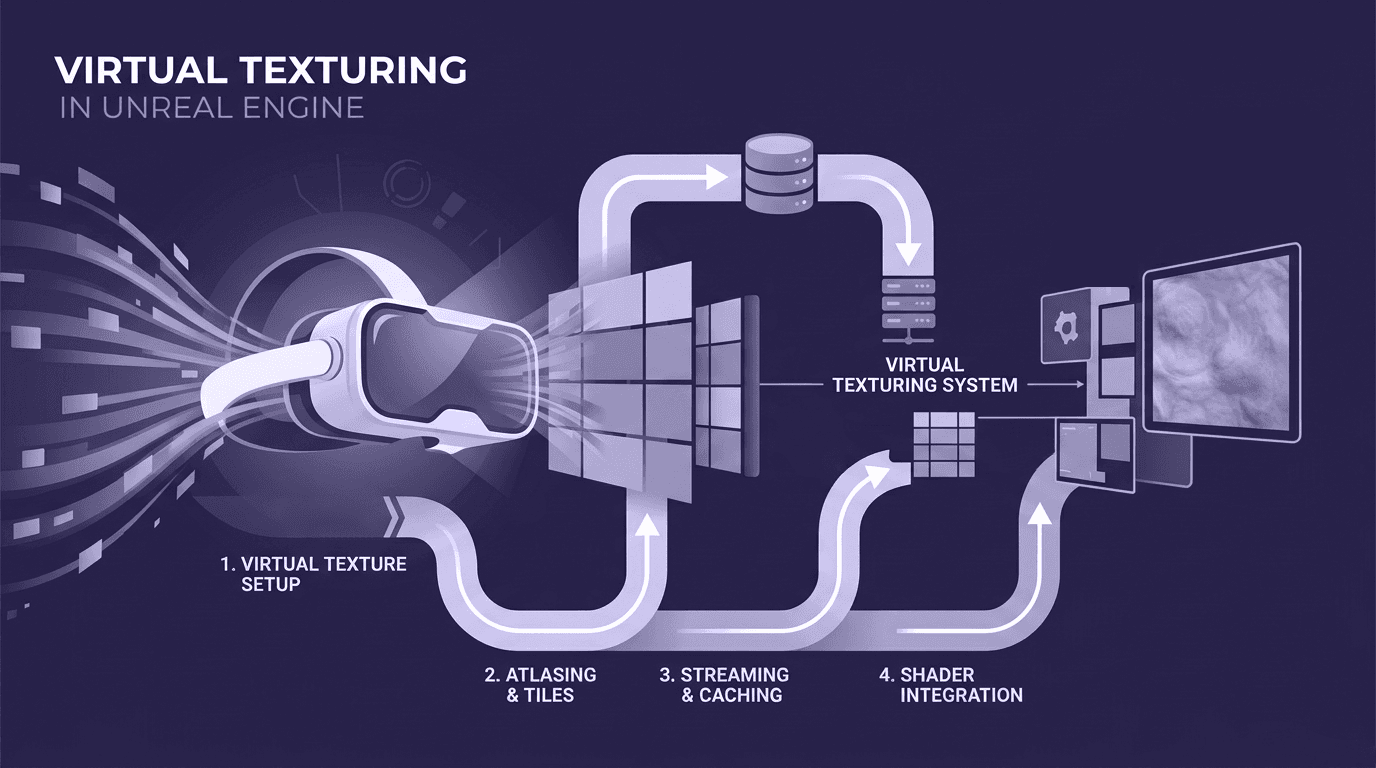
Virtual Texturing in Unreal Engine is a technique that allows large textures to be handled more efficiently by only loading the visible portions required at any given time. Instead of loading an entire high-resolution texture into memory, the engine breaks it into smaller tiles and streams only what the camera sees.
This is especially useful in VR, where maintaining performance is critical. Large, detailed environments often require high-resolution textures, but loading all of them at once can overwhelm GPU memory. Virtual Texturing solves this by making high-detail scenes more manageable without sacrificing visual quality.
How virtual texturing improves performance and memory usage
The main advantage of Virtual Texturing is efficient memory usage. By streaming texture data on demand, Unreal Engine significantly reduces the amount of memory required at runtime. This allows developers to use higher-resolution textures without causing performance drops.
In VR, where frame rate stability is essential, this approach helps maintain smooth performance. It also reduces bandwidth usage between CPU and GPU, which is another critical factor in real-time rendering. As a result, Virtual Texturing enables more complex and detailed scenes to run efficiently on a wider range of hardware.
Types of virtual textures (Streaming virtual textures, Runtime virtual textures)
Unreal Engine provides two main types of Virtual Texturing:
- Streaming virtual textures (SVT):
These are used for large static textures. They stream texture data from disk-based storage, making them ideal for environments with high-resolution assets. - Runtime virtual textures (RVT):
These are generated dynamically during runtime and are often used for blending textures, terrain shading, or combining multiple materials into a single output. They help reduce draw calls and improve performance in complex scenes.
Both types play an important role in optimizing VR experiences. By using Virtual Texturing effectively, developers can achieve a balance between high visual fidelity and the performance requirements necessary for immersive VR applications.
Step-by-step: Setting up VR textures in Unreal Engine
Importing and configuring textures for VR projects
The first step in any VR texturing workflow is importing your textures into Unreal Engine. This is typically done by dragging and dropping files into the Content Browser. However, simply importing textures is not enough; proper configuration is essential for VR performance.
Once imported, adjust key settings such as compression type, texture group, and mipmap generation. For example, normal maps should use the correct compression format, while color textures should have sRGB enabled. Assigning textures to appropriate texture groups (like World or UI) helps Unreal automatically optimize them for VR platforms.
Creating materials using VR-optimized textures
After importing textures, the next step is creating materials in the Material Editor. Here, you connect texture maps (albedo, normal, roughness, etc.) to their respective inputs to define how surfaces appear under lighting.
For VR, it’s important to keep materials efficient. Avoid overly complex shader graphs or excessive texture sampling, as these can increase rendering cost. Instead, focus on clean, optimized materials that deliver strong visual results without unnecessary overhead.
Enabling and using virtual texturing in Unreal Engine
To take advantage of Virtual Texturing, you need to enable it in Unreal Engine’s project settings. Once enabled, textures can be converted into virtual textures, allowing them to stream dynamically during runtime.
This involves selecting textures, enabling virtual texture streaming, and updating materials to support this workflow. While the setup is straightforward, it provides significant performance benefits, especially for large scenes with high-resolution assets.
Testing textures in a VR environment
The final step is testing your textures inside a VR setup. What looks good on a monitor may not translate well in VR, so it’s important to evaluate textures in an immersive context.
Check for issues such as blurriness, aliasing, or inconsistent lighting. Pay attention to how textures appear at different distances and angles. Performance testing is equally important, monitoring frame rates, and ensuring that texture quality does not introduce lag or instability.
By iterating through testing and adjustments, you can refine your textures to achieve both visual quality and performance, two critical factors for successful VR experiences.
Best practices for VR texture optimization
Choosing the right texture resolution for VR
In VR, resolution decisions have a direct impact on both clarity and performance. While high-resolution textures (4K and above) can improve visual fidelity, using them indiscriminately can quickly exhaust GPU memory. The key is prioritization, reserve higher resolutions for hero assets and objects that users interact with closely, while using lower resolutions for background elements.
A consistent texel density across assets is also important. This ensures that textures appear uniform in quality, avoiding situations where some objects look sharp while others appear blurry.
Using mipmaps, LODs, and compression effectively
Mipmaps are essential in VR because they reduce aliasing and improve performance by displaying lower-resolution versions of textures at a distance. Unreal Engine generates these automatically, but proper configuration ensures optimal results.
Level of Detail (LOD) systems complement this by reducing both geometry and texture complexity based on distance. Combined with efficient compression formats, these techniques significantly lower memory usage while maintaining acceptable visual quality.
Maintaining performance while preserving visual quality
Achieving the right balance between performance and quality is critical in VR. High-quality textures should be used strategically rather than uniformly. Focus on the details where users are most likely to look and interact, and reduce complexity in peripheral areas.
Material optimization also plays a role, limiting the number of texture samples and avoiding expensive shader operations. A well-optimized material can often deliver similar visual results at a fraction of the performance cost.
Avoiding common mistakes in VR texturing
Several common mistakes can negatively impact VR experiences:
- Using unnecessarily high-resolution textures for all assets
- Ignoring compression and mipmap settings
- Creating overly complex materials
- Failing to test textures in an actual VR environment
Avoiding these pitfalls helps maintain a smooth and immersive experience. In VR, even small inefficiencies can compound quickly, so attention to detail in texture optimization is essential for success.
Challenges and limitations of VR textures in Unreal Engine
Performance constraints in VR rendering
VR demands significantly higher performance than traditional applications because scenes must be rendered twice, once for each eye, while maintaining high frame rates. This puts heavy pressure on the GPU, making texture management a critical factor. High-resolution textures, if not optimized, can quickly become a bottleneck, leading to frame drops that disrupt immersion and user comfort.
Memory and bandwidth limitations
Textures consume a large portion of GPU memory, and in VR projects, this can escalate rapidly. Large environments with multiple high-resolution assets can exceed memory limits, especially on standalone VR devices. Additionally, transferring texture data between CPU and GPU requires bandwidth, and inefficient texture usage can slow down rendering pipelines.
This makes techniques like Virtual Texturing, compression, and streaming essential, not optional, for managing resource constraints effectively.
Balancing realism with optimization
One of the biggest challenges in VR development is balancing visual realism with performance. While highly detailed textures improve immersion, they also increase rendering cost. Over-optimization, on the other hand, can make environments feel flat and unrealistic.
The goal is to find a middle ground, delivering enough detail to maintain immersion while ensuring smooth performance. This requires continuous testing, iteration, and a strong understanding of how textures behave within Unreal Engine’s rendering pipeline.
Future trends in VR texturing and Unreal Engine
AI and procedural texture generation
AI-driven tools are making texture creation faster and more scalable. From generating tileable textures to upscaling low-resolution assets, AI is reducing manual workload and enabling rapid experimentation. Procedural systems further enhance this by allowing textures to be dynamically generated and adjusted in real time.
Real-time rendering advancements in Unreal Engine
Unreal Engine continues to evolve with improvements in real-time rendering, including better lighting systems and more efficient resource management. These advancements allow developers to push visual quality further while maintaining VR performance standards.
Increasing demand for high-fidelity VR experiences
As VR adoption grows, user expectations for realism and immersion are increasing. This drives the need for higher-quality textures, better optimization techniques, and more efficient workflows. Developers who stay updated with these trends will be better positioned to create competitive VR experiences.
Building better VR experiences with optimized textures
Textures are a foundational element in VR development, directly influencing realism, immersion, and performance. In Unreal Engine, understanding how textures work, from basic PBR maps to advanced Virtual Texturing, is essential for building effective VR environments.
For beginners, the key takeaway is balance. High-quality textures should be used strategically, supported by proper optimization techniques such as mipmaps, compression, and streaming. By combining strong fundamentals with efficient workflows, developers can create visually compelling VR experiences without compromising performance.
As VR technology continues to evolve, mastering texture workflows will become even more important. Those who invest time in understanding and optimizing textures today will be better equipped to build immersive, high-performance VR applications in the future.

Max Calder
Max Calder is a creative technologist at Texturly. He specializes in material workflows, lighting, and rendering, but what drives him is enhancing creative workflows using technology. Whether he's writing about shader logic or exploring the art behind great textures, Max brings a thoughtful, hands-on perspective shaped by years in the industry. His favorite kind of learning? Collaborative, curious, and always rooted in real-world projects.
Latest Blogs

The Indie Dev Guide to CC0 PBR Textures: Stop Searching, Start Cr...
PBR textures
AI in 3D design

Mira Kapoor
Jul 10, 2026

Sourcing Free Game Textures: Navigating PBR Pipelines and Stylize...
PBR textures
Game textures
Mira Kapoor
Jul 6, 2026

Sculpting with Sunlight: The Architectural Physics of Facade Text...
Texture creation
AI in 3D design

Max Calder
Jul 1, 2026

Accelerate you workflow
with automated PBR texture generation
Enjoy creative freedom with AI powered texture creation
 Texturly
Copyright © 2026 Texturly, Asha Technology Labs Pvt. Ltd. All rights reserved