Creating Seamless Wood Textures for Realistic Rendering and Design
By Max Calder | 3 June 2026 | 12 mins read
Table of contents
Table of Contents
Wood textures play a major role in how realistic a design feels. Whether it’s architectural visualization, furniture rendering, game environments, or product design, the quality of a wood texture can immediately influence the perceived realism of the final result. However, many projects still suffer from one common issue: visible seams and repetitive tiling. A texture may look detailed on its own, but once repeated across a larger surface, the illusion breaks. Repeating grain patterns, mismatched edges, and inconsistent lighting quickly make even high-quality renders feel artificial.
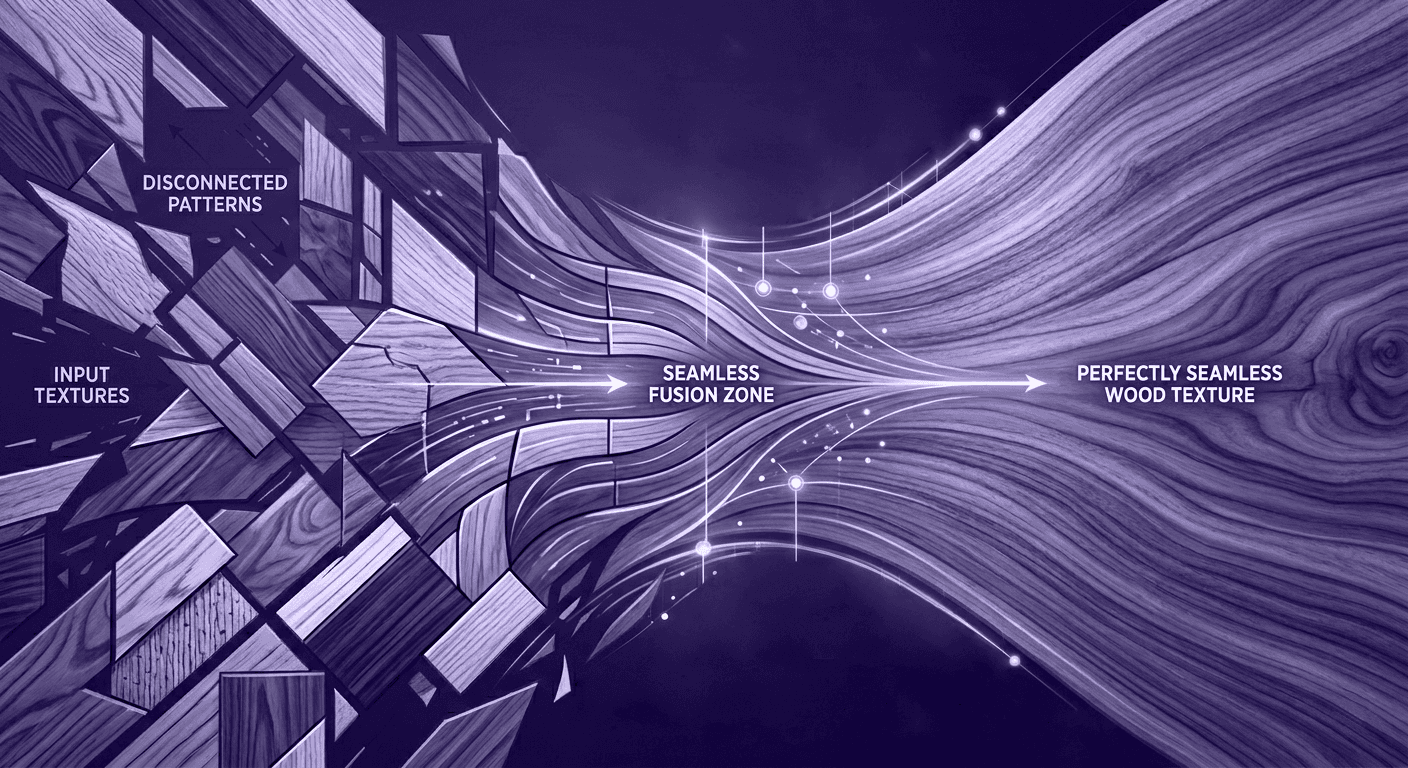
Creating seamless wood textures solves this problem by allowing textures to repeat naturally without visible transitions. This not only improves realism but also creates a cleaner and more professional workflow for designers working across large scenes or multiple assets. In this guide, we’ll explore how to create seamless wood textures step by step, from preparing source images to refining tiling and generating supporting PBR maps for more realistic materials.
Understanding seamless wood textures and their role in realistic design
What makes a wood texture seamless
A seamless wood texture is designed so that its edges connect perfectly when repeated across a surface. When tiled horizontally or vertically, there should be no visible lines, abrupt grain changes, or repeating borders. This is especially important with wood because natural grain patterns are highly directional and visually recognizable. Even small inconsistencies in alignment can become obvious once the texture is repeated multiple times.
A properly seamless texture maintains:
- Continuous grain flow
- Consistent lighting and color
- Balanced detail distribution
- Invisible edge transitions
The goal is to make the repetition impossible to notice, even across large surfaces.
Why seamless textures are essential in 3D and visualization workflows
In modern design workflows, textures rarely appear only once. A single wood texture may cover:
- Large walls or floors in architectural visualization
- Furniture surfaces in product rendering
- Multiple assets inside game environments
- Garments or accessories in digital fashion scenes
Without seamless tiling, these repeated surfaces quickly expose visible patterns that reduce realism.
Seamless textures also improve workflow efficiency. Instead of manually adjusting materials for every object, designers can reuse a single optimized texture across multiple assets while maintaining visual consistency. For real-time rendering and large-scale scenes, this becomes critical. A seamless texture system reduces asset complexity while preserving detail and realism.
Popular wood texture styles used in design
Different design industries rely on different wood texture styles depending on the intended mood and application.
Oak textures are commonly used for modern interiors and furniture because of their balanced grain and versatile appearance.
Walnut textures create a darker, premium aesthetic often associated with luxury products and high-end architectural spaces.
Pine and cedar textures are lighter and more organic, making them popular in rustic or natural design environments.
Some workflows also use:
- Brushed wood textures for industrial aesthetics
- Weathered wood textures for vintage environments
- High-gloss wood finishes for luxury visualization
Each style behaves differently under lighting, which is why seamless quality and proper material setup are essential for believable results. Understanding how seamless textures function is the foundation for creating realistic wood materials. Before refining seams or generating PBR maps, the quality of the base texture itself must be carefully prepared.
Preparing high-quality source images for seamless wood texture creation
Choosing the right wood reference image
The quality of a seamless texture starts with the source image. Even the best editing workflow cannot fully fix a poor reference, which is why image selection is one of the most important steps.
A strong wood reference should have:
- Sharp and consistent grain detail
- Even lighting across the surface
- Minimal shadows or reflections
- High enough resolution for large-scale use
Images with heavy perspective distortion, uneven exposure, or strong directional shadows create problems later during tiling. Since wood grain naturally contains a lot of variation, any lighting inconsistency becomes even more noticeable once repeated. For professional workflows, it’s best to capture textures under soft, diffused lighting conditions or use well-calibrated texture photography.
Managing lighting, shadows, and perspective
One of the biggest mistakes in texture creation is using images with baked lighting. Highlights and shadows may look attractive in a single image, but when tiled repeatedly, they create unrealistic repetition patterns.
A clean wood texture should appear neutral and evenly lit. This allows lighting inside the render engine or design software to control the final appearance naturally. Perspective is equally important. If the wood surface is photographed at an angle, the grain lines may distort toward the edges, making seamless alignment difficult.
To avoid this:
- Capture images from a straight, perpendicular angle
- Correct lens distortion before editing
- Remove harsh directional shadows when possible
The cleaner the base image, the easier it becomes to create realistic, seamless results.
Avoiding distorted grain patterns and inconsistent details
Wood grain has a natural directional flow. If the source image contains abrupt pattern changes or inconsistent scaling, those issues become amplified after tiling. Knots, cracks, and strong grain features should also be used carefully. While they add realism, placing them incorrectly can create obvious repetition when the texture repeats across large surfaces.
The goal is balance:
- Enough variation to feel natural
- Enough consistency to tile invisibly
Professional texture artists often select areas of wood that contain moderate detail without overly dominant features. This creates a texture that remains believable while avoiding distracting repetition. A seamless texture workflow becomes significantly easier when the source material is prepared correctly. Good references reduce cleanup work, improve tiling quality, and create a stronger foundation for realistic wood materials.
Step-by-step process for creating seamless wood textures
Cropping and aligning texture edges correctly
The first step in creating a seamless wood texture is preparing the image so the edges can connect naturally when repeated. This usually involves cropping the texture into a square or balanced rectangular format while preserving consistent grain direction. Alignment is critical. If the grain abruptly changes direction at the edges, the seam becomes immediately visible once tiled. The texture should feel continuous, as though the pattern naturally extends beyond the image boundaries.
In most workflows, designers shift or offset the image temporarily to bring the seams into the center. This makes edge inconsistencies easier to identify and correct before final export.
Blending seams naturally without visible transitions
Once the seams are visible in the center, the next step is blending them smoothly into the surrounding grain structure. The challenge with wood textures is that grain patterns are organic and directional. Simple blurring often destroys realism, making the texture look muddy or artificial. Instead, the goal is to preserve natural grain flow while removing visible transitions.
This is typically achieved by:
- Carefully cloning nearby grain details
- Softly blending tonal differences
- Maintaining consistent texture density across the surface
The seam should disappear without creating areas that look overly edited.
Maintaining consistent wood grain direction and flow
Wood grain continuity is what makes a texture believable. Even if seams are technically invisible, inconsistent grain movement can still make repetition obvious. Horizontal grains should continue smoothly across tiles, while vertical grain textures must maintain alignment from top to bottom. Sudden direction changes or mirrored sections often create unnatural visual rhythm.
It’s also important to avoid excessive symmetry. Perfectly mirrored textures may tile seamlessly, but they rarely feel natural in realistic rendering environments. The best seamless wood textures preserve organic variation while maintaining structural consistency.
Testing texture tiling across large surfaces
A texture should never be judged only in a small preview window. Many tiling problems become visible only when the texture is repeated multiple times across a larger area.
After seam cleanup, the texture should be tested on:
- Large flat surfaces
- Different lighting conditions
- Various scales and viewing distances
This helps identify:
- Repetition patterns
- Visible tonal shifts
- Grain inconsistencies
- Edge artifacts
A texture that works well at scale feels natural and visually balanced, even when repeated dozens of times. Creating seamless wood textures is ultimately a process of refinement. Small adjustments in alignment, blending, and grain continuity can dramatically improve realism and make the final material feel far more professional.
Enhancing wood materials with PBR maps for greater realism
Why roughness and normal maps improve realism
A seamless base texture is only part of a realistic wood material. To create believable surfaces in modern rendering workflows, additional PBR maps are essential. Wood interacts with light in subtle ways. Smooth, polished wood reflects light differently than rough unfinished timber, and small surface details influence how shadows and highlights behave across the material.
This is where roughness and normal maps become important.
A roughness map controls how reflective or matte different parts of the wood appear. Areas with worn polish, exposed grain, or uneven finishing naturally reflect light differently, adding depth and realism.
A normal map simulates fine surface details without increasing geometry. Small grooves, grain depth, and micro-imperfections become visible through lighting interaction, helping flat surfaces feel more tactile and dimensional.
Without these supporting maps, even high-resolution wood textures can appear flat and artificial.
Generating PBR maps from a base wood texture
Traditionally, creating PBR maps required manual editing and significant technical work. Designers had to carefully extract depth information, balance contrast, and calibrate material properties individually. Modern workflows simplify this process by generating PBR maps directly from the base texture image.
This allows designers to quickly create:
- Roughness maps for reflectivity variation
- Normal maps for surface depth
- Height maps for displacement workflows
- Ambient occlusion maps for subtle shadow detail
The challenge is maintaining realism. Overly strong normal maps or exaggerated roughness often make wood materials feel synthetic rather than natural. The best results come from subtle enhancement rather than aggressive processing.
Balancing detail while maintaining a natural appearance
One of the most common mistakes in wood material creation is overprocessing textures in pursuit of realism. Excessive sharpness, overly deep grain, or high-contrast roughness can make surfaces appear noisy and unnatural.
Realistic wood materials rely on controlled detail:
- Fine variation instead of exaggerated depth
- Natural grain definition without harsh edges
- Soft reflectivity transitions instead of extreme contrast
Lighting also plays a major role. A texture that looks balanced under one HDR environment may appear too glossy or too flat under another. This is why PBR materials should always be tested under multiple lighting conditions before final use. When seamless textures are combined with well-calibrated PBR maps, wood materials gain the depth, variation, and realism needed for professional visualization workflows.
Common mistakes that make wood textures look artificial
How repeating patterns break realism in wood textures
One of the fastest ways to ruin realism is obvious repetition. Even a high-quality texture can start looking artificial when the same grain pattern repeats across a large surface. Human eyes are naturally good at detecting patterns, especially in organic materials like wood. Repeated knots, identical grain curves, or recurring dark patches quickly expose the texture tiling underneath the material.
This becomes particularly noticeable in:
- Large wooden floors
- Wall panels
- Furniture surfaces
- Architectural visualization scenes
Reducing repetition requires more than seamless edges. Variation in grain flow, tone, and detail distribution is essential for creating believable materials.
Overprocessed textures and unrealistic sharpness
Many wood textures are edited too aggressively in an attempt to make details “pop.” Excessive sharpening, high contrast, and overly strong normal maps often produce a synthetic look that feels disconnected from real wood.
In reality, wood surfaces contain soft transitions and subtle imperfections. Fine detail should enhance realism, not dominate the material.
A balanced texture maintains:
- Natural grain softness
- Controlled contrast
- Realistic surface depth
- Subtle lighting interaction
Professional-quality materials usually rely on restraint rather than extreme enhancement.
Incorrect texture scale and grain direction
A technically seamless texture can still feel wrong if the scale is inaccurate. Grain patterns that are too large or too small relative to the object immediately affect realism. For example, oversized grain on furniture surfaces can make materials feel exaggerated, while extremely small grain patterns flatten the visual depth of the wood.
Grain direction also matters. Wood naturally follows structural flow, and inconsistent orientation across connected surfaces can create unrealistic transitions. Always validate textures directly on the final model instead of judging them only from a flat preview.
Problems caused by baked lighting and shadows
Another common issue is using textures that contain embedded lighting information. Shadows, highlights, or directional reflections inside the base texture may look visually appealing at first, but they conflict with scene lighting during rendering. When the rendering engine applies new lighting on top of already-lit textures, the result feels inconsistent and artificial.
Clean wood textures should remain neutral, allowing the rendering environment to control:
- Shadows
- Reflections
- Surface highlights
- Material depth
This creates far more realistic and flexible materials across different scenes and lighting conditions. Avoiding these mistakes is just as important as mastering the technical workflow. Realistic wood materials come from subtlety, consistency, and careful control, not excessive detail or aggressive editing.
Accelerating texture workflows with AI and modern texture tools
AI-assisted seamless wood texture generation
Creating seamless wood textures manually can be time-consuming, especially when working with large material libraries or multiple design variations. Traditional workflows often involve repetitive editing tasks such as seam cleanup, grain alignment, and detail balancing.
AI-assisted tools simplify this process by automatically analyzing the texture and generating seamless tiling patterns with minimal manual correction. Instead of rebuilding textures from scratch, designers can start with a reference image and quickly transform it into a repeatable material.
This significantly reduces production time while maintaining consistent quality across assets.
Automating PBR map creation and texture cleanup
Another major advantage of modern texture tools is automation. Generating roughness, normal, or height maps manually requires technical expertise and careful calibration. For large workflows, this quickly becomes inefficient.
AI-driven systems can now generate these maps automatically from a base image while preserving alignment between texture channels. This creates more cohesive materials and reduces the risk of mismatched surface behavior.
Modern workflows also help correct common texture issues such as:
- Uneven lighting
- Visible seams
- Low-detail areas
- Inconsistent sharpness
By automating these repetitive tasks, designers can spend more time refining materials creatively instead of manually repairing them.
Improving workflow efficiency with tools like Texturly
Platforms like Texturly combine multiple stages of the texture workflow into a single system. Instead of switching between separate applications for seamless editing, map generation, and image enhancement, designers can manage the process more efficiently in one place.
This includes capabilities such as:
- Image-to-seamless texture generation
- AI-powered PBR map creation
- Texture adjustments for brightness, contrast, saturation, and sharpness
- Faster preparation of production-ready materials
For designers working in architecture, furniture visualization, gaming, or product rendering, this type of workflow reduces both iteration time and technical overhead. As texture libraries continue growing and production timelines become shorter, AI-assisted workflows are shifting from optional tools to practical necessities. The goal is no longer just creating textures; it’s creating scalable, consistent, and production-ready material systems efficiently.
From raw wood images to production-ready materials
Creating seamless wood textures is about far more than removing visible seams. It’s a process that combines strong source material, careful grain management, realistic PBR mapping, and disciplined refinement to produce materials that feel natural at scale.
As rendering quality continues to improve across architecture, product visualization, gaming, and digital design, expectations for texture realism are increasing as well. Repetitive patterns, baked lighting, and poorly calibrated materials are now far easier to notice, making clean texture workflows more important than ever.
The most effective wood materials rely on balance:
- Seamless tiling without obvious repetition
- Detailed grain without overprocessing
- Realistic surface response through properly calibrated PBR maps
- Consistency across different lighting environments
Modern AI-assisted workflows are also changing how textures are created and optimized. Tasks that once required extensive manual editing, such as seamless generation, texture cleanup, and PBR map creation, can now be handled more efficiently, allowing designers to focus more on creative decisions and less on repetitive technical work.
Ultimately, realistic wood textures are not just visual assets. They are foundational elements that influence the quality, immersion, and professionalism of the final design.

Max Calder
Max Calder is a creative technologist at Texturly. He specializes in material workflows, lighting, and rendering, but what drives him is enhancing creative workflows using technology. Whether he's writing about shader logic or exploring the art behind great textures, Max brings a thoughtful, hands-on perspective shaped by years in the industry. His favorite kind of learning? Collaborative, curious, and always rooted in real-world projects.
Latest Blogs

The Indie Dev Guide to CC0 PBR Textures: Stop Searching, Start Cr...
PBR textures
AI in 3D design

Mira Kapoor
Jul 10, 2026

Sourcing Free Game Textures: Navigating PBR Pipelines and Stylize...
PBR textures
Game textures
Mira Kapoor
Jul 6, 2026

Sculpting with Sunlight: The Architectural Physics of Facade Text...
Texture creation
AI in 3D design

Max Calder
Jul 1, 2026

Accelerate you workflow
with automated PBR texture generation
Enjoy creative freedom with AI powered texture creation
 Texturly
Copyright © 2026 Texturly, Asha Technology Labs Pvt. Ltd. All rights reserved