When to Ditch Nodes for AI: A Texturly vs. Adobe Substance Workflow Comparison
By Mira Kapoor | 22 December 2025 | 13 mins read
Table of contents
Table of Contents
The art of 3D texturing, the process of giving digital objects the visual realism of real-world materials, is currently undergoing a profound transformation. For years, the industry standard has been the node-based procedural workflow, championed by applications like Adobe Substance Designer, offering artists unparalleled, non-destructive control. This system, while powerful, demands a steep learning curve and a significant investment of time and expertise from its users.
Today, a new wave of AI-first platforms, most prominently represented by Texturly, is challenging this established order. These tools are built on the promise of speed and accessibility, allowing users to generate high-quality, game-ready materials in mere seconds using simple text prompts or single-image uploads. This revolutionary shift forces creative teams to ask a critical question: when does the efficiency and instantaneous power of AI outweigh the granular, technical control of traditional node authoring? This guide will break down the essential differences, features, and target users for both Texturly and the Adobe Substance suite to help you make the right choice for your modern 3D pipeline.
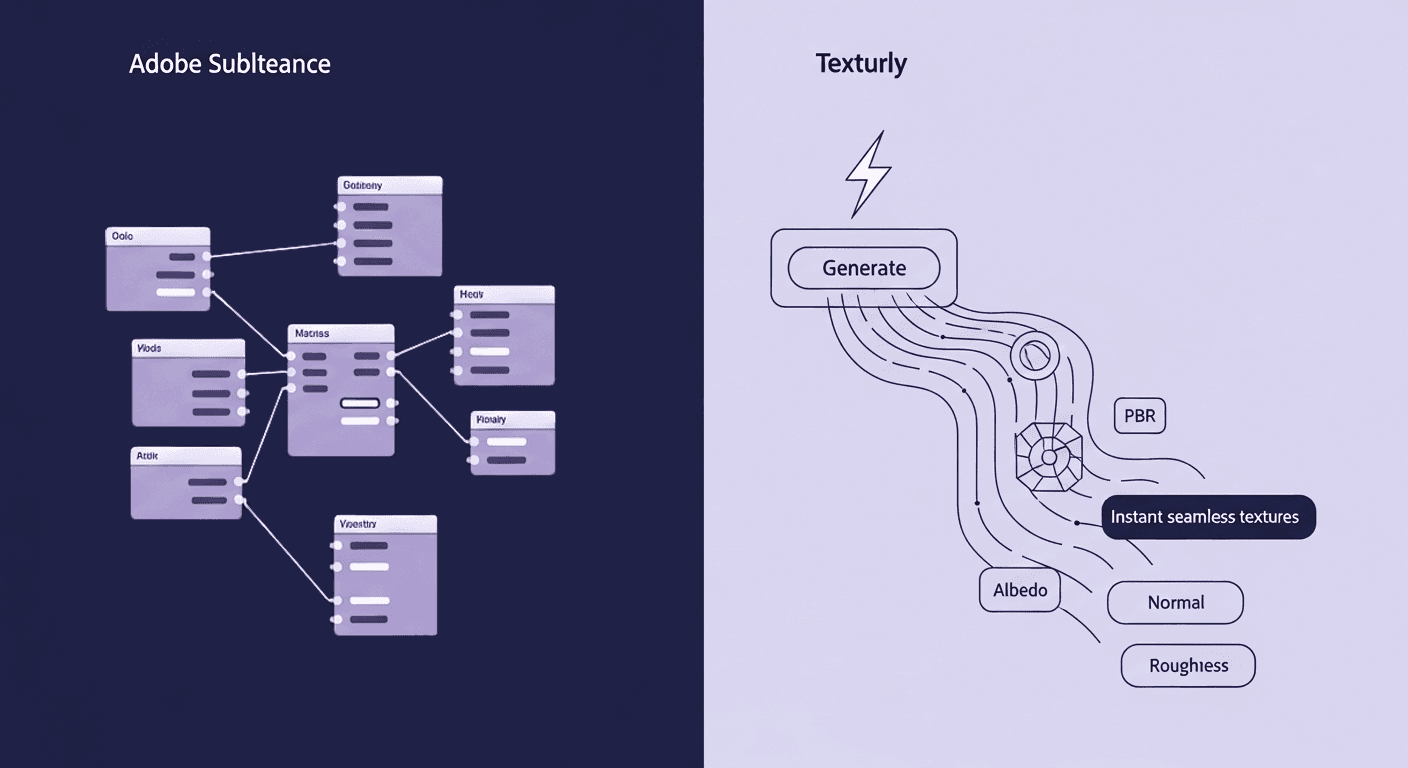
Generative automation vs. Procedural control
At the core of the Texturly vs Adobe Substance debate lies a fundamental shift in how materials are created. This is not merely a comparison of tools, but a contrast between two opposing philosophies: AI-driven generative automation and traditional procedural control. One prioritizes speed, accessibility, and instant results; the other emphasizes precision, logic, and non-destructive craftsmanship. Understanding this distinction is essential because it shapes everything from how quickly materials are produced to who can realistically create and maintain them within a production pipeline.
Texturly: The age of instant material generation
Texturly's workflow is centred around maximizing output speed with minimal manual input. The core philosophy is to remove friction and automate the most tedious parts of texture creation: seam removal, tiling, and generating the necessary Physically Based Rendering (PBR) maps.
- Input: A simple text prompt ("weathered copper with green patina") or a single base image (a photo of brick).
- Processing (AI): The platform instantly analyzes the request, eliminating seams to ensure perfect tiling, and simultaneously generates the full suite of PBR maps (Albedo, Normal, Roughness, Metallic, Height, Ambient Occlusion).
- Output: A complete, ready-to-use PBR material that can be fine-tuned with simple slider adjustments and exported as a PNG format.
This approach is about rapidity and volume, offering an infinite material where the user dictates the need through language or a single reference image.
Adobe Substance: The power of the procedural node graph
Adobe Substance, particularly Substance 3D Designer, is founded on the concept of proceduralism. This means materials are not static files, but rather live, non-destructive mathematical formulas.
- Input: A blank canvas or a collection of simple geometric or noise nodes.
- Processing (node-based): The artist connects hundreds of nodes (functions) in a graph to simulate the real-world properties of a material, controlling everything from the grain of wood to the exact level of rust and dirt.
- Output: A fully parametric material (an SBSAR file) whose properties can be infinitely adjusted and randomised without losing quality or starting over.
This workflow is about infinite control and perfect non-destructibility, but requires significant time to author the node graph structure.
Key differences between Texturly vs. Adobe Substance
- AI vs. Node-based workflow: Texturly uses AI to generate textures instantly from prompts or images, while Adobe Substance relies on node graphs that require deeper technical skill and manual setup.
- Speed of production: Texturly delivers seamless textures and full PBR maps in seconds. Substance offers more control but takes significantly longer due to graph building, tweaking, and manual iteration.
- Ease of use: Texturly is built for artists, designers, and teams who want fast results without learning procedural workflows. Substance demands expertise in nodes, parameters, and material logic.
- Editing & tweaking: Texturly includes simple sliders for brightness, contrast, saturation, and sharpness. Substance offers advanced material editing but requires navigating complex graphs and parameters.
- Input flexibility: In Texturly, you can either prompt from scratch or upload an existing texture to make it seamless and generate PBR maps. In Substance, you must either create materials procedurally or use presets from Substance 3D Assets.
- Learning curve: Texturly can be used effectively in minutes. Substance often takes weeks or months to master, especially for non-technical artists.
Texturly vs Adobe Substance workflow: A head-to-head comparison
The real difference between Texturly and Adobe Substance becomes most apparent when you examine how each fits into a production workflow. From the moment a material idea is formed to the point it is deployed inside a game engine or render scene, these platforms demand very different levels of time, technical involvement, and iteration overhead. A direct, step-by-step comparison of their workflows reveals where AI-powered generation accelerates production, and where procedural systems still justify their complexity.
Pipeline integration and compatibility
- Texturly: Texturly is built for a modern, fast-moving pipeline. There are no complex node graphs to learn, no parameters to troubleshoot, and no long onboarding period. The workflow is straightforward: describe the texture, generate it, and iterate instantly. Each regeneration takes seconds, making it extremely easy to test variations. This simple loop, describe, generate, refine, eliminates the technical overhead typically required in texture creation.
Because Texturly exports ready-to-use PBR maps, artists can drop them directly into Unreal, Unity, Blender, Maya, or any engine without additional adjustments. The simplicity mirrors an auto-setup workflow, allowing teams to stay focused on creative direction rather than procedural logic. - Adobe Substance 3D: Adobe Substance Designer and Painter are industry standards for procedural materials, but they come with a steep learning curve. Designer uses a node-based system that gives professionals deep control over every detail, from surface microstructure to fractal noise, but it requires hours of practice to use effectively. Artists must understand how nodes blend, how masks interact, and how generator stacks affect the final material.
This gives Substance unmatched procedural precision, but it also makes it slower for common or repetitive tasks. Teams often rely on specialized technical artists to build or maintain graphs, which introduces dependencies and reduces speed for non-technical team members.
Pricing and licensing models
The licensing models reflect the core difference in utility: a focused, credit-based AI service versus an all-inclusive suite of software applications.
Texturly pricing (credit-based subscription)
- Basic: 20 credits/month (Focus on texture & tile generation)
- Standard: 200 credits/month, ~$29/month/user (adds PBR map generation, email/chat support)
- Professional: 1000 credits/month, ~$79/month/user (adds Texture editing, priority support)
Adobe Substance 3D pricing (monthly subscription, estimated)
- Substance 3D Texturing Plan (individual): ~₹1,995.38/mo (Includes Painter, Sampler, Designer + Assets)
- Substance 3D Collection (individual): ~₹4,789.62/mo (Includes Painter, Sampler, Designer, Stager + Assets)
- Substance 3D Collection for Teams: Higher per-license cost with business features, cloud storage, and support
Licensing comparison:
- Texturly: Utilizes a credit-based model, meaning users pay for the results (generations/PBR map creation) rather than perpetual desktop access. This is ideal for burst production and project-based work.
- Adobe Substance 3D: Uses a traditional SaaS subscription model, providing access to a suite of desktop applications and a library of assets. The cost is a fixed monthly fee per user, regardless of the volume of materials generated.
The learning curve
- Texturly: Zero-to-hero speed. The platform is built around maximum accessibility. Its AI core automates complex processes, allowing users to achieve high-quality, professional results simply by writing a text prompt or uploading a photograph. This eliminates the need for extensive training and makes the learning curve extremely low.
- Adobe Substance 3D: High skill ceiling. While Substance Painter and Sampler are relatively accessible, Substance Designer, the flagship material creation tool, operates on a deep, node-based procedural logic. Mastering this environment requires a significant time investment to understand how nodes interact to create material properties, but it unlocks the highest level of detail and artistic freedom.
Easier to use (accessibility)
- Texturly: Extremely Easy. The focus is on a fast, streamlined workflow. Its key features are one-click automations: generate texture from a prompt, upload a texture image to make it seamless, and generate a full set of PBR from a base image. Users can also fine-tune the output using simple sliders for brightness, saturation, contrast, and sharpness, all without touching a node graph.
- Adobe Substance 3D: Moderately Complex. The suite is powerful but fragmented across multiple applications (Sampler for photo conversion, Designer for nodes, and Painter for model application). While Sampler does use AI to convert photos to PBR and is relatively easy, the full Substance workflow often requires moving between applications and managing complex node structures in Designer to achieve truly custom or procedural results.
What is Texturly and who’s it for?
Texturly is an AI-powered texture creation platform that completely automates the laborious tasks of texture creation and PBR mapping. It is built around a simplified, rapid workflow, moving from a simple concept (text or image) to a game-ready material in seconds, making it the leader in the movement to abandon time-consuming node authoring.
Core features
- AI texture generation from text prompt: Create unique, tileable textures by simply describing your material vision, freeing you from manual design.
- Seamless texture tool: Automatically turn any uploaded image into a perfectly tileable, seamless texture, eliminating hours of manual seam removal.
- Automated PBR material creation: Generates a full set of Physically Based Rendering (PBR) maps (Normal, Roughness, Metallic, AO, etc.) from a single base image or prompt-generated image, ensuring materials are lifelike and game-engine ready.
- Customization: Allows users to easily tweak the generated textures and PBR maps, including adjusting properties like brightness, contrast, saturation, and sharpness to fine-tune the final look.
Strengths
- Speed and automation: Generate textures in seconds, drastically speeding up the material pipeline.
- Accessibility: Low learning curve, empowering artists without specialized procedural texturing skills.
- Ease of use: Simple customization tools (brightness, saturation, etc.) for rapid art direction matching
Limitations
- Control depth: Lacks the granular, non-destructive procedural control of a node graph for creating highly custom, logic-driven effects
- Limited scope: Dedicated solely to material creation; does not include 3D painting, sculpting, or scene staging tools.
Who is Texturly for?
Texturly is designed for:
- 3D artists who want quick, high-quality textures without graph complexity
- Indie developers & small studios who don’t have a dedicated technical art team
- Concept artists who need fast iteration during early look-dev
- Product designers & visualizers who need photorealistic materials on demand
- Anyone who wants consistent, stylistically unified materials across multiple assets
It’s built for creators who prioritize speed, simplicity, and visual coherence over procedural micromanagement.
What is Adobe Substance, and who’s It for?
Adobe Substance 3D is an industry-leading suite of tools for 3D material authoring, texturing, and rendering, now integrated into the Adobe Creative Cloud. While it incorporates AI elements (Substance 3D Sampler uses Adobe Sensei to create materials from photos), its core strength lies in its diverse toolset that offers ultimate, detailed control over every aspect of a material.
Core applications
- Substance 3D Designer: The definitive node-based tool for creating complex, parametric materials from scratch.
- Substance 3D Painter: The industry-standard tool for painting textures directly onto 3D models with layers, smart materials, and advanced material behaviors.
- Substance 3D Sampler: A Tool for turning photos into 3D materials with AI-powered automation.
Strengths
- Unparalleled control: Node-based workflow ensures absolute mastery over procedural and parametric detail.
- Comprehensive suite: End-to-end tools for material authoring, painting, and staging in one integrated ecosystem.
- Industry standard: Preferred choice for professional studios in gaming, film, and high-end visualization.
Limitations
- High subscription cost: The cost of the full suite is a significant financial commitment.
- Steep learning curve: Node-based Designer requires a considerable time investment to achieve proficiency.
- Time commitment: Creating complex assets still involves significant manual node setup time.
Who is Adobe Substance For?
Substance is best suited for:
- Technical artists who understand procedural workflow and node graph logic
- AAA game studios are creating hero materials and high-precision surfaces
- VFX teams requiring physically accurate, film-quality materials
- Product visualization teams working with complex materials like plastics, composites, or car paints
- Artists who want full control over every detail of a texture’s composition
- Pipeline-heavy teams that benefit from Adobe’s deep integration with Painter and other software
It works particularly well in pipelines where procedural consistency, advanced material layering, and handcrafted control are must-haves.
Which is the best option for your team?
The choice between Texturly and Adobe Substance is a clear, modern trade-off between time and control. Your team’s needs will dictate whether the agility of AI is better than the precision of the node graph.
For teams that prioritize speed, simplicity, and low overhead, Texturly is the definitive modern solution. By embracing the AI-first generation, Texturly completely eliminates the need to build complex node graphs for basic or even complex materials. Its ability to generate seamless PBR sets from a text prompt or a single image, combined with its simple tweaking tools, provides an immediate, streamlined workflow. This makes it the superior option for rapid prototyping, concept art, and indie development, effectively allowing you to ditch the nodes and the learning curve for instant, customizable results.
Conversely, if your team is a large studio creating hero assets for a blockbuster game or film, Adobe Substance remains the industry backbone. The comprehensive, interconnected Substance suite offers a level of non-destructive procedural control (in Designer) and real-time 3D painting (in Painter) that AI-generation alone cannot yet match. For unique, highly parametric materials that must be controlled down to the smallest detail, the node-based workflow is irreplaceable.
Ultimately, the future of texturing is likely a hybrid pipeline. Texturly serves as the agile vanguard for rapid ideation and volume asset creation, while Substance acts as the powerful finishing tool for final, bespoke hero assets. For most modern teams, however, the sheer efficiency and low barrier to entry offered by Texturly’s AI-powered automation present a compelling case to retire the intricate node graph workflow once and for all.

Mira Kapoor
Mira leads marketing at Texturly, combining creative intuition with data-savvy strategy. With a background in design and a decade of experience shaping stories for creative tech brands, Mira brings the perfect blend of strategy and soul to every campaign. She believes great marketing isn’t about selling—it’s about sparking curiosity and building community.
Latest Blogs

The Indie Dev Guide to CC0 PBR Textures: Stop Searching, Start Cr...
PBR textures
AI in 3D design

Mira Kapoor
Jul 10, 2026

Sourcing Free Game Textures: Navigating PBR Pipelines and Stylize...
PBR textures
Game textures
Mira Kapoor
Jul 6, 2026

Sculpting with Sunlight: The Architectural Physics of Facade Text...
Texture creation
AI in 3D design

Max Calder
Jul 1, 2026

Accelerate you workflow
with automated PBR texture generation
Enjoy creative freedom with AI powered texture creation
 Texturly
Copyright © 2026 Texturly, Asha Technology Labs Pvt. Ltd. All rights reserved