How Successful Games Use Free Textures: Case Studies & Pro Techniques
By Mira Kapoor | 3 April 2026 | 14 mins read
Table of contents
Table of Contents
You’ve built your environment, placed your assets, and everything technically works, but something feels off. The world looks repetitive, flat, or just not as polished as you imagined. It’s easy to blame the assets. Maybe the textures aren’t high-quality enough. Maybe you need premium packs to make it look “professional.” That assumption holds a lot of developers back.
The truth is, many successful games don’t rely on expensive textures at all. Instead, they use freely available resources and transform them through smart design choices, clever material setups, and strong art direction. The difference isn’t the asset itself; it’s how it’s used.
This guide takes a practical, case-study-driven approach to show exactly how developers make free textures work at a professional level. We’ll break down real techniques used across different types of games, from stylized worlds to realistic environments.
Because once you understand how to control textures, you stop depending on them and start designing with intent.
Why free textures work in modern game development
Before we jump into case studies, it’s important to understand why free textures are no longer a limitation. In fact, in many modern workflows, they’re a perfectly viable foundation, even for professional projects.
The quality gap has largely disappeared
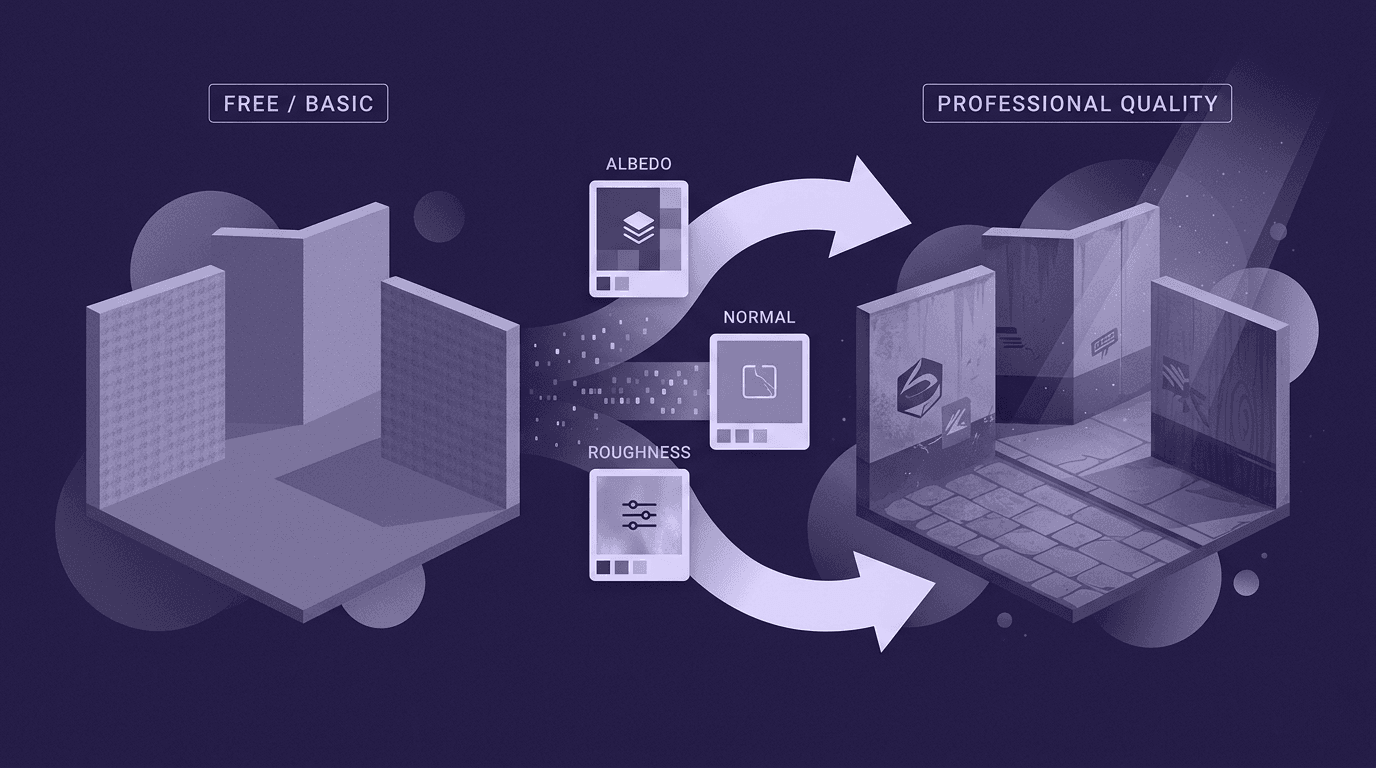
A few years ago, free textures often meant low resolution, poor lighting, or unusable maps. That’s no longer the case. Today, many free resources come as full PBR (Physically Based Rendering) texture sets, including albedo, roughness, normal, and displacement maps.
This means they behave correctly under lighting right out of the box. From concrete and wood to fabric and metal, you can now find production-ready materials without spending anything.
Budget constraints are a real design factor
Not every project has the luxury of a large asset budget. Indie developers, small teams, and even prototypes in larger studios need to move fast without overspending. Free textures reduce upfront cost and allow teams to focus resources where it matters most: gameplay, mechanics, and polish.
But more importantly, they force efficiency. When you don’t rely on buying new assets for every problem, you start thinking in systems, reuse, variation, and smart composition.
The real limitation is implementation
Here’s the key shift: free textures don’t fail because they’re free; they fail when they’re used without modification.
If you apply a texture as-is, without adjusting scale, roughness, or variation, it will look generic. Repetition becomes obvious. Surfaces feel artificial. But with even basic adjustments, color tweaks, overlays, decals, or lighting changes, the same texture can feel completely unique.
That’s why experienced developers don’t ask, “Is this texture good enough?”
They ask, “How can I make this texture work in my scene?”
And that’s exactly what the following case studies will demonstrate.
Case studies: How games use free textures effectively
Understanding the theory is useful, but the real insight comes from how it’s applied. Across different types of games, developers consistently use the same core strategies to turn simple or free textures into something visually compelling.
Let’s break down the most common approaches.
Stylized games: Winning with simplicity
Stylized games rarely depend on high-resolution or hyper-detailed textures. Instead, they lean heavily on art direction, color, and shape language to define their look.
In many cases, textures are intentionally simple, sometimes even flat. What makes them work is how they’re presented. Soft gradients, controlled color palettes, and consistent lighting create a cohesive visual identity that doesn’t rely on realism.
Techniques used:
- Minimal texture detail with strong color control
- Gradient-based shading instead of complex maps
- Consistent lighting to unify assets
- Reusing the same textures across multiple objects
Key takeaway: When the style is strong, texture complexity becomes less important. Simplicity, when intentional, looks polished, not cheap.
Realistic games: Layering for depth
Realistic games take the opposite approach, but still rely heavily on free textures. Instead of using a single texture per surface, they layer multiple maps and details to create depth.
A basic concrete texture, for example, becomes far more believable when combined with dirt overlays, roughness variation, and subtle normal details. These layers break uniformity and add realism without requiring custom assets.
Techniques used:
- Combining multiple PBR maps for one material
- Adding decals (dirt, cracks, stains) to break the repetition
- Adjusting roughness values for natural light variation
- Using normal maps to simulate fine detail
Key takeaway: Realism doesn’t come from one perfect texture; it comes from how multiple simple textures are combined.
Large environments: Reuse at scale
Open-world and exploration-based games face a different challenge: scale. Creating unique textures for every surface is simply not practical. Instead, these games rely on reusability and modular design.
The same texture might appear hundreds of times across a scene, but smart techniques prevent it from feeling repetitive.
Techniques used:
- Seamless tiling textures applied across large surfaces
- Texture atlases to pack multiple details into one map
- UV scaling to vary texture density across objects
- Rotating and offsetting textures to reduce visible repetition
Key takeaway: Repetition isn’t the problem; visible repetition is. Smart variation makes reuse invisible.
Atmospheric games: Let lighting do the work
Some of the most visually striking games don’t rely on texture detail at all, they rely on lighting, mood, and post-processing.
In horror, narrative, or cinematic games, even basic textures can feel rich when combined with the right atmosphere. Fog, shadows, and color grading can completely transform how a surface is perceived.
Techniques used:
- Strong directional lighting to create contrast
- Fog and volumetric effects to add depth
- Color grading (LUTs) to unify the scene
- Subtle overlays like dust or grunge
Key takeaway: A well-lit scene can elevate average textures, but poor lighting will ruin even the best ones.
Practical workflow: Using free textures like a professional
Knowing how successful games use free textures is one thing; applying those techniques consistently is where most developers struggle. A solid workflow makes the difference between a scene that looks stitched together and one that feels cohesive and intentional.
Here’s how to approach free textures like a professional.
Build a clean, reusable texture library
Before you start applying anything, organize your assets. Randomly downloading textures and using them project-by-project leads to inconsistency.
Create a structured library:
- Group by material type (wood, fabric, metal, ground, etc.)
- Keep full PBR sets together (Albedo, Roughness, Normal, etc.)
- Use clear naming conventions
This allows you to reuse textures across projects while maintaining visual consistency.
Never use textures as-is
This is one of the biggest mistakes beginners make. A raw texture, even a high-quality one, will almost always look generic if applied directly.
Instead, make small adjustments:
- Tweak color balance to match your scene
- Adjust roughness to control how light interacts
- Blend in subtle grunge or wear maps
- Modify contrast to avoid flat surfaces
Even minor changes can make a widely used free texture feel unique.
Break repetition with variation techniques
Repetition is the fastest way to make a scene look artificial. The goal isn’t to avoid reuse, it’s to hide it.
Use simple techniques:
- Add decals (dirt, stains, cracks) on top of base textures
- Use vertex painting to blend between multiple textures
- Slightly offset or rotate UVs across objects
- Mix two similar textures for variation
These methods create visual noise that tricks the eye into seeing complexity.
Maintain consistent scale and detail
One overlooked issue is texture scale inconsistency. If one surface has large visible patterns and another has tiny ones, the scene immediately feels off.
Make sure:
- Texture density matches across objects
- Fabric weaves, wood grains, and surface details are proportionally correct
- UV scaling is adjusted per object, not reused blindly
Consistency in scale is subtle, but critical for realism.
Optimize without sacrificing quality
Free textures are often high-resolution, which can impact performance if used carelessly.
Balance quality and efficiency:
- Downscale textures where ultra-detail isn’t needed
- Reuse materials instead of creating duplicates
- Use texture atlases where possible
- Limit excessive layering in real-time engines
A well-optimized scene with smart texture usage will always outperform a heavy, unoptimized one.
Common mistakes to avoid
Free textures are powerful, but only when used correctly. Most visual issues don’t come from the textures themselves, but from how they’re applied. Avoiding a few common mistakes can instantly improve the quality of your scenes.
Overusing textures without variation
Applying the same texture repeatedly across large surfaces is the fastest way to break immersion. Patterns become obvious, and the scene starts to feel artificial.
Fix: Always introduce variation, use decals, blend maps, or slight UV adjustments to break uniformity.
Mixing inconsistent styles
Not all free textures are created with the same artistic intent. Combining photorealistic textures with stylized or mismatched assets creates visual conflict.
Fix: Stick to a consistent style. Either adjust textures to match each other or curate your library carefully before use.
Incorrect texture scaling
A common but subtle issue is that textures are too large or too small for the object. Oversized fabric weaves or tiny concrete details immediately feel unrealistic.
Fix: Always adjust UV scale based on real-world proportions. Compare surfaces to maintain consistency across the scene.
Ignoring roughness and normal maps
Many developers focus only on the base color (albedo) and ignore the maps that actually define how a material behaves under light.
Fix: Properly use roughness and normal maps. These control surface detail and light interaction, which are essential for realism.
Relying on textures instead of lighting
Even good textures will look flat in poorly lit scenes. Lighting plays a major role in how materials are perceived.
Fix: Treat lighting as part of your material workflow. Test textures under different lighting conditions and refine accordingly.
Creativity is the real budget
By now, the pattern should be clear. Successful games don’t rely on expensive textures; they rely on how those textures are used.
Across every case study, the same principles show up again and again. Stylized games simplify. Realistic games layer. Large environments are reused intelligently. Atmospheric scenes lean on lighting. In each case, free textures are just the starting point, not the final result.
That’s the shift that matters.
When you stop treating textures as finished assets and start treating them as raw material, your entire workflow changes. You begin to think in terms of variation, composition, and control. A single texture becomes multiple surfaces. A simple material becomes something rich and believable.
And most importantly, you stop depending on the budget to define quality.
Because in modern game development, the gap between “free” and “premium” assets is smaller than ever. What separates professional-looking games from the rest isn’t access to better resources; it’s the ability to use those resources with intention.
So instead of asking, “Do I need better textures?”
Start asking, “Am I using my textures well enough?”
That’s where the real improvement happens.

Mira Kapoor
Mira leads marketing at Texturly, combining creative intuition with data-savvy strategy. With a background in design and a decade of experience shaping stories for creative tech brands, Mira brings the perfect blend of strategy and soul to every campaign. She believes great marketing isn’t about selling—it’s about sparking curiosity and building community.
Latest Blogs

The Indie Dev Guide to CC0 PBR Textures: Stop Searching, Start Cr...
PBR textures
AI in 3D design

Mira Kapoor
Jul 10, 2026

Sourcing Free Game Textures: Navigating PBR Pipelines and Stylize...
PBR textures
Game textures
Mira Kapoor
Jul 6, 2026

Sculpting with Sunlight: The Architectural Physics of Facade Text...
Texture creation
AI in 3D design

Max Calder
Jul 1, 2026

Accelerate you workflow
with automated PBR texture generation
Enjoy creative freedom with AI powered texture creation
 Texturly
Copyright © 2026 Texturly, Asha Technology Labs Pvt. Ltd. All rights reserved