Build 3D Textures That Actually Close Deals
By Max Calder | 30 March 2026 | 14 mins read
Table of contents
Table of Contents
You've nailed the model, and the lighting is dialed in, but the final render still feels… flat. It's that subtle gap between a good visualization and a great one, the difference between showing a design and making a client truly feel the space. This guide is here to close that gap. We’re going to unpack the entire professional workflow for building believable 3D textures, moving from core concepts to the practical techniques that give surfaces a sense of history and realism. Getting this right isn't just an artistic tweak; it's about building a predictable pipeline that creates more convincing visuals, eliminates late-night fixes, and gets you to client sign-off faster.
Unpack the fundamentals: The building blocks of 3D texturing
Let's clear something up right away, because it trips up a lot of teams. When we talk about making a surface look real, people often use material and texture interchangeably. They're not the same. Getting this right is the first step to a faster, more predictable workflow.
Differentiate between materials and textures
Think of it like this: a texture is just one ingredient. It’s the visual information, the image of wood grain, the pattern of marble veins, the gritty surface of concrete. It’s the paint color.
A material, on the other hand, is the whole recipe. It defines the substance itself. It tells the render engine how that surface should behave in the light. Is it rough or smooth? Metallic or plastic? Does it reflect a sharp, clear image or a blurry glow? The material is the lacquered wood itself, the texture is the grain, but the material includes the glossiness of the finish, the subtle bumps, and how it feels to the light.
In short, textures provide the look. Materials provide the physics. You can't have a believable surface without both working together. This distinction is crucial because it helps you diagnose problems. Is the color wrong? Check the texture. Does it look weirdly flat or plasticky? Your material settings are the culprit.
Explore the essential texture maps (The PBR Workflow)
Most modern archviz pipelines rely on Physically Based Rendering, or PBR. It’s not just a buzzword; it’s a methodology for creating materials that react realistically under any lighting condition. This is a massive advantage because you can build a material once and trust it to look correct, whether it's in direct sun, under overcast skies, or lit by interior lamps. It’s all about predictability.
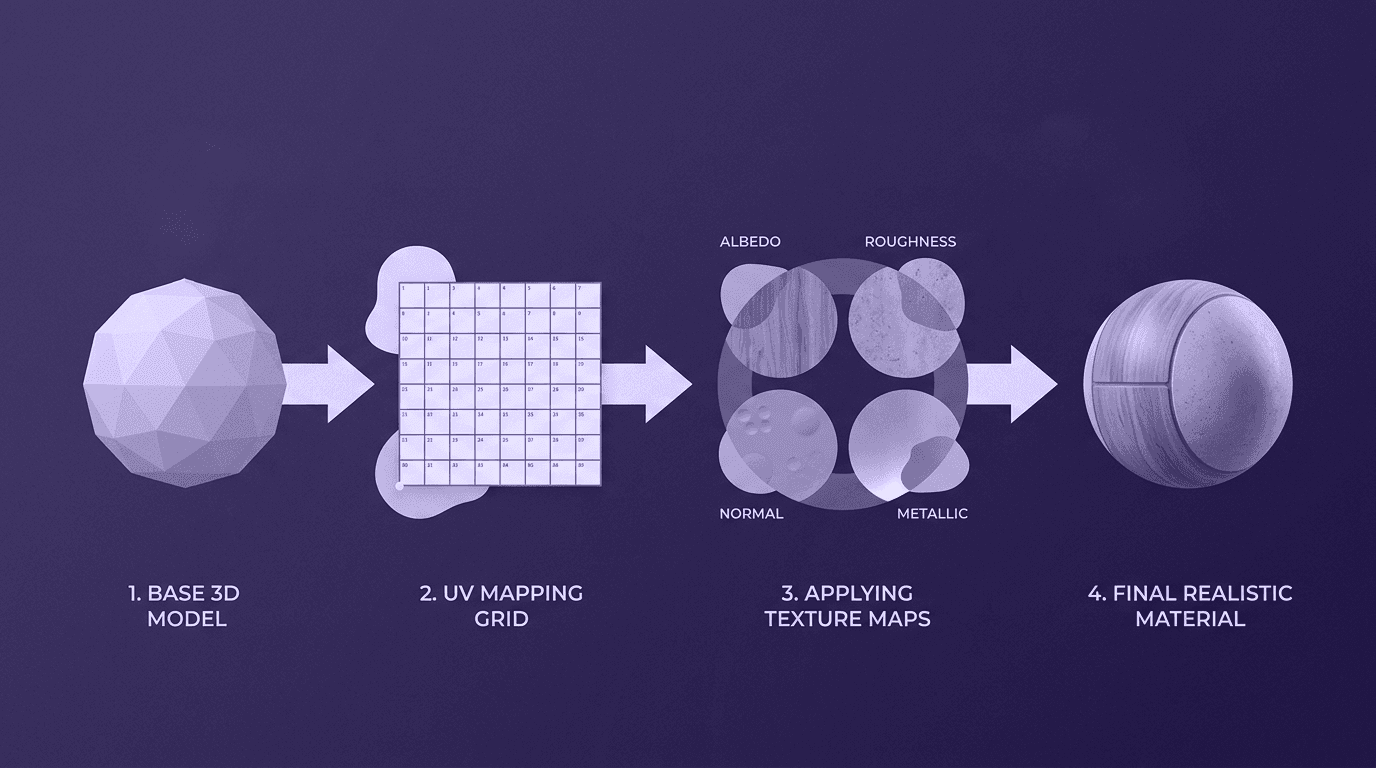
A PBR material is built from a set of specialized texture maps. Here are the core four you need to know:
- Albedo (or Base Color): This is the purest version of your texture's color, completely stripped of any lighting or shadow information. Think of a photo of a brick wall taken on a perfectly overcast day, no harsh shadows, no bright highlights. That's your Albedo. It’s the foundational color and pattern of the surface.
- Normal: This is where the magic happens. A Normal map is a special texture that fakes intricate surface detail without adding a single polygon to your model. The purples, blues, and greens in the map tell the render engine how to bounce light, creating the illusion of cracks, pores, and bumps. It’s how you get the gritty detail on a concrete floor or the subtle imperfections in a wooden beam, keeping your scene lightweight and fast.
- Roughness (or Glossiness): This map is arguably the most important for achieving realism. It’s a grayscale image that controls how light scatters across a surface. A pure black value means the surface is perfectly smooth, like a mirror or polished chrome, creating sharp, clear reflections. A pure white value means it’s completely rough, like unpolished concrete, scattering light so much that you get no clear reflection at all. Most surfaces live somewhere in between, and this map is what gives them their unique character.
- Metallic: This one’s straightforward. It’s a grayscale map that tells the engine if a surface is a metal or a non-metal (a "dielectric"). A white value means 100% metallic, like raw steel or gold. A black value means it's not a metal, like wood, plastic, or stone. You almost never use in-between gray values, unless you're dealing with something like rusty metal, where the surface is a mix. This map fundamentally changes how the surface reflects light, so getting it right is critical.
These four maps work in concert to define nearly any surface you can imagine. Mastering how they interact is the key to building a robust, reusable library of materials that will make every project look better.
Prepare your canvas: Mastering UV mapping
You can have the world's most beautiful textures, but if they're applied incorrectly, they'll look like a stretched, pixelated mess. The bridge between your 3D model and your 2D textures is UV mapping. It’s not the most glamorous part of the job, but wrestling with it is a rite of passage we can help you avoid.
What is UV mapping, and why is it critical for architectural models
So, what is UV mapping? Think of it as creating a flattened blueprint of your 3D model. Imagine taking a cardboard box and carefully cutting along the seams to lay it flat. That flat piece of cardboard is your UV map. The 3D model’s coordinates are described in X, Y, and Z, while the 2D texture’s coordinates are U and V, hence UV mapping.
This process creates a guide that tells your software exactly how to wrap a 2D image texture onto your 3D object's surface. For architectural models, this is non-negotiable. Without proper UVs, that seamless brick texture on a building facade will warp at the corners. The expensive Italian marble texture on a countertop will look stretched and unnatural. Clear, well-laid-out UVs ensure your 3D surface design looks intentional and professional, not like a happy accident.
Choose the right projection method for common architectural shapes
Getting a perfect UV unwrap doesn't always have to be a painstaking manual process. Your 3D software has a set of projection tools that work like smart templates. Choosing the right one for the job gets you 90% of the way there in seconds. Here are the go-to methods for architectural elements:
- Planar mapping: This is the simplest method. It projects the UVs from a single plane, like a slide projector. It’s perfect for flat surfaces with no depth, such as floors, walls, ceilings, or a pane of glass. One click, and you’re done.
- Box / Cubic mapping: This is your workhorse for any simple geometric form. It projects the texture from six different sides, just like the faces of a cube. Use this for structural columns, wooden beams, kitchen islands, and concrete planters. It automatically handles the different sides, saving you the hassle of unwrapping each one manually.
- Cylindrical mapping: As the name suggests, this method wraps the texture around an object as if it were a can label. It's the obvious choice for anything curved or tube-shaped, think round pillars, pipes, metal railings, or custom light fixtures. It ensures the texture flows smoothly around the curve without pinching or distortion.
Starting with the right projection method dramatically cuts down on the time you spend tweaking seams and fixing distortion. It's a foundational step that sets you up for a clean, professional texturing workflow.
Create your surface story: Core texture mapping techniques
With your model properly unwrapped, it's time to create the actual textures. Your goal is to tell a story with your surfaces, making them feel like they belong in the real world. Broadly, there are two main paths to creating high-quality textures: using what already exists or generating something entirely new.
Technique 1: Use photographic sources for realistic finishes
This is the most direct route to photorealism. Using high-resolution photos of real-world surfaces gives you an instant foundation of authentic detail. But it’s not as simple as just downloading an image and applying it.
The key is to source well-shot photos, taken in flat, even lighting, to avoid baked-in shadows, and then make them seamless. A seamless texture can be tiled repeatedly across a large surface without any obvious seams or repetition. This is essential for large architectural features like brick walls, wooden floors, or wallpaper. A visible seam instantly shatters the illusion.
- Recommended tools: For editing and creating seamless versions of your photos, Texturly, Adobe Photoshop, or Affinity Photo are indispensable. For sourcing professional-grade, pre-made textures, libraries like Poliigon or Quixel Megascans are the industry standard. They provide entire PBR material sets that are already seamless and calibrated for realism, saving you an enormous amount of time.
Technique 2: Leverage procedural generation for infinite variation
Sometimes, a photographic texture isn't the right tool for the job. For vast surfaces like asphalt roads, large stucco exteriors, or even subtle fabric weaves, photographic tiling can become repetitive and obvious. This is where procedural textures shine.
Procedural textures aren't static images; they are generated by an algorithm based on mathematical rules. Think of them as code-based patterns. Because they're generated on the fly, they can be tweaked infinitely and never, ever repeat. You can change the color, scale, and complexity of the pattern with a few sliders, offering incredible artistic control and flexibility for client feedback.
- Recommended tools: Substance 3D Designer is the undisputed king of procedural material creation. It uses a node-based interface to build complex materials from scratch. For those working in Blender, its built-in Shader Node Editor offers a surprisingly powerful (and free) way to generate complex procedural materials without ever leaving the application.
Choosing between these texture mapping techniques depends on the task. For a unique hero surfaces like a specific marble countertop, a photographic source is perfect. For large, uniform surfaces that need subtle variation, procedural is the way to go.
Add believability: How to create realistic textures in 3D models
A clean texture is a good start, but reality is messy. The difference between a sterile, CG-looking image and a truly convincing architectural visualization lies in the imperfections. This is how to create realistic textures in 3D models: you have to add the small details that tell a story of use, time, and environment.
Layer imperfections for authentic 3D surface detailing
No surface in the real world is perfectly clean or uniform. To achieve authentic 3D surface detailing, you need to layer subtle imperfections on top of your base materials. Think about how a building actually weathers. Water stains appear under windowsills and drains. Dirt accumulates in the crevices of a concrete wall. The edges of a painted metal railing get scuffed and worn over time. Foot traffic leaves faint wear patterns on a wooden floor.
These details ground the model in reality. You can add these effects using grunge maps, grayscale images of dirt, scratches, or smudges, and blend them into your base material. By layering these subtle cues, you transform a generic surface into one with a history, making the entire scene feel more lived-in and believable to the client.
Use decals and overlays for targeted details
What if you need to add a very specific detail, like a crack in a specific spot on a wall, a small patch of graffiti, or a room number sign next to a door? You don’t want to edit your main tileable texture for that; it would be inefficient and create repetition. The solution is to use decals.
Decals are essentially digital stickers. They are small textures with transparency that can be projected onto a surface independently of the underlying material. This technique allows you to add highly specific, localized details with complete control over placement and scale. It’s an incredibly efficient way to add complexity and realism without creating massive, custom texture maps for every single surface.
Check your work: How lighting interacts with texture rendering
Here’s a critical step that many artists skip: a texture or material is only as good as it looks under different lighting. A material can look perfect in one lighting setup but completely flat or artificial in another. The success of your texture rendering is revealed when light interacts with the normal and roughness maps.
Make it a habit to test your key materials under a variety of lighting conditions. Drop them into a simple scene and view them with different HDRIs: bright, direct midday sun; a soft, overcast sky; and the sharp, low-angle light of a sunset. This is how you check your work.
- Does the concrete feel rough enough when the light hits it at a grazing angle?
- Are the reflections on the polished floor breaking up correctly?
- Does the metal look like plastic?
This testing phase, often called "look development" or "lookdev," is what separates amateurs from professionals. It ensures your materials are robust and will hold up under any lighting scenario your final scene requires.
Optimize your pipeline: Integrating texturing into an archviz workflow
Creating beautiful textures is one thing. Doing it efficiently, consistently, and at scale across an entire firm is another. A well-defined texturing pipeline isn't just a technical exercise; it's a business strategy that saves money, reduces errors, and helps your team deliver stunning visuals on time, every time.
Build a reusable, firm-wide material library
This is the single most impactful step you can take to streamline your archviz workflow. Instead of having every artist create or source materials from scratch for every new project, build a centralized, curated material library.
Frame this as creating a company asset. A well-organized library ensures visual consistency across all projects, reinforcing your firm's brand and quality standards. It dramatically cuts down on project setup time and makes onboarding new team members a breeze, they can get up to speed by using pre-approved, high-quality materials from day one. Establish a clear folder structure and a strict naming convention (e.g., MaterialType_Color_Descriptor_Version, like Wood_Oak_LightRift_01). This small bit of organization pays massive dividends in the long run.
Manage textures for large, complex architectural scenes
Architectural scenes are notoriously heavy. Huge buildings, detailed landscapes, and high-resolution renders can bring even powerful workstations to their knees. Smart texture management is essential for keeping performance up and render times down.
Here are some best practices for optimization:
- Optimize texture resolution: Not every texture needs to be 8K. Use high-resolution textures only for "hero" assets that will be close to the camera. For surfaces in the mid-ground or background, 2K or even 1K textures are often more than sufficient. This practice, known as texel density, is crucial for memory management.
- Choose the right file formats: Don't save every map as a lossless PNG. Use compressed .jpg for Albedo/Color maps, as the slight quality loss is often imperceptible. For data-critical maps like Normal, Roughness, or masks, use a lossless format like .png or .tif to preserve the precise detail.
- Leverage tiled textures and trim sheets: To cover massive areas like facades or landscapes efficiently, use seamless, tiled textures in combination with procedural noise or grunge maps to break up repetition. For advanced optimization, explore trim sheets. A trim sheet is a single texture that contains multiple different surface details, like various metal trims, grates, bolts, and seams. By mapping different parts of a model to different areas of this single sheet, you can texture complex assets with just one material, which is incredibly efficient for the render engine.
By building a smart pipeline, you move from just making pretty pictures to creating a scalable, efficient visualization engine for your entire firm.
Your surface is your story
We've covered a lot of ground, from the physics of PBR to the art of adding imperfections. But let's zoom out for a second. All those techniques, tools, and texture maps have one single job: to help you tell a more convincing story.
A flat, lifeless render shows a client the shape of a building. But a surface with history, texture, and subtle imperfections lets them feel the space. The way light catches the scuffs on a wooden floor, the subtle water stain beneath a window, the cool roughness of a concrete wall, that’s not just realism. That’s communication.
This is how you move from just making pretty pictures to creating a scalable, efficient visualization engine for your entire firm. You now have the blueprint to not only build better textures but to build a better workflow. One that saves time, ensures consistency, and ultimately, wins clients.
Mastering 3D texturing isn't about becoming a technical wizard. It’s about closing that final gap between your design intent and what a client truly feels. You’ve got the tools. Now go build something they can believe in.

Max Calder
Max Calder is a creative technologist at Texturly. He specializes in material workflows, lighting, and rendering, but what drives him is enhancing creative workflows using technology. Whether he's writing about shader logic or exploring the art behind great textures, Max brings a thoughtful, hands-on perspective shaped by years in the industry. His favorite kind of learning? Collaborative, curious, and always rooted in real-world projects.
Latest Blogs

The Indie Dev Guide to CC0 PBR Textures: Stop Searching, Start Cr...
PBR textures
AI in 3D design

Mira Kapoor
Jul 10, 2026

Sourcing Free Game Textures: Navigating PBR Pipelines and Stylize...
PBR textures
Game textures
Mira Kapoor
Jul 6, 2026

Sculpting with Sunlight: The Architectural Physics of Facade Text...
Texture creation
AI in 3D design

Max Calder
Jul 1, 2026

Accelerate you workflow
with automated PBR texture generation
Enjoy creative freedom with AI powered texture creation
 Texturly
Copyright © 2026 Texturly, Asha Technology Labs Pvt. Ltd. All rights reserved