The Smart Designer's Guide to Seamless Texture Generators (Free & AI Tools)
By Max Calder | 4 May 2026 | 10 mins read
Table of contents
Table of Contents
No one gets into art direction to spend their day hunting down visible seams. You’re there to guide a vision, not to wrestle with a tiling texture in Photoshop that just refuses to cooperate. This is where modern seamless texture generators come in, and this guide is your complete playbook for picking the right one for your studio. We’ll unpack the non-negotiable features every production-ready tool needs, compare the best generators on the market, and show you exactly how to plug them into a professional pipeline. Because this isn't just about saving time on a tedious task. It’s about shifting your team's focus from mind-numbing manual cleanup back to what they were hired for: making incredible art.
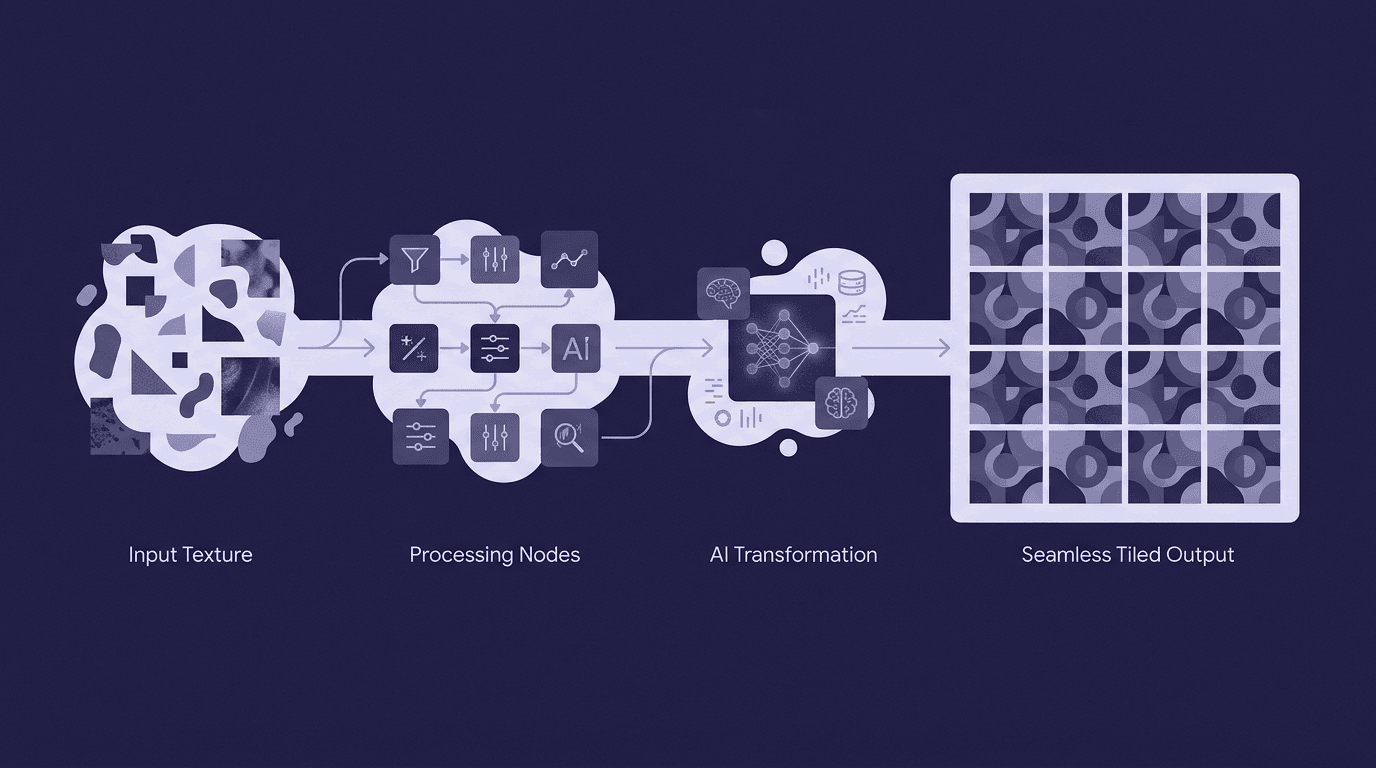
Why your workflow needs more than just a tiling filter
We’ve all been there, clone-stamping away at a texture that looked perfect until you mapped it onto a large surface. Traditional procedural tools like Substance Designer are incredibly powerful, but they can feel like cracking a walnut with a sledgehammer when all you need is a quick, high-quality tiling texture for prototyping or background assets.
This is where AI-powered seamless texture generators change the game. They aren’t just a fancier tiling filter; they’re a creative partner. Instead of just repeating pixels, they understand the idea of the material you want, worn leather, ancient cobblestone, sci-fi paneling, and generate it from scratch, perfectly seamless from the start. The result? You get to move from the mind-numbing, repetitive task of manual cleanup to what you were hired to do in the first place: focusing on art direction and making stunning visuals.
Think of it as the difference between building a brick wall one brick at a time versus designing the entire building. These tools handle the labor, freeing you up to make the high-level creative decisions that really matter. Now, let's unpack how to choose the right one for your studio's pipeline.
How to pick the right seamless texture generator for your pipeline
Choosing a tool isn't just about cool-looking demos; it's about how well it plugs into your team's existing workflow. A great generator needs to be more than a fun toy; it has to be a reliable production workhorse. Here’s what to look for.
PBR map generation
This is non-negotiable for modern 3D design. A seamless texture generator that only outputs a color (Albedo) map is a dead end. For materials to react believably to light in engines like Unreal or Unity, you need a full set of PBR maps. The best tools will generate Albedo, Normal, Roughness, Metalness, and often Ambient Occlusion (AO) or Height/Displacement maps simultaneously. This ensures your AI-generated wood feels rough and non-reflective, while your generated metal looks sharp and shiny, all without extra steps.
Resolution & export
Your generator needs to meet your project's technical standards. For most game development and real-time applications, 2K (2048x2048) is the baseline, with 4K (4096x4096) being the standard for hero assets. For VFX and high-end archviz, you might even need 8K. Check that the tool can output at these resolutions and supports lossless formats like PNG or TIFF. For workflows requiring high dynamic range, like displacement maps, support for EXR is a huge plus.
Tiling quality
The entire point is to eliminate seams. A top-tier tool uses sophisticated algorithms to ensure its output is perfectly tileable without any jarring repetitions or visible edges. The litmus test is simple: apply the texture to a large plane in your 3D software of choice. If you can’t spot the repeat from a distance, the algorithm is doing its job. Mediocre tools often create textures that technically tile but have noticeable patterns, forcing you back into manual cleanup, the very thing you were trying to avoid.
Art direction control
The AI shouldn’t be a black box. You need the ability to guide it to match your project's art style. The best seamless texture generators provide multiple control levers. This can range from detailed text prompts and negative prompts to uploading a reference image to guide the style, or even sliders to tweak parameters like crack intensity, moss coverage, or color variation. The more control you have, the more the tool feels like an extension of your own creativity.
API & integration
For a studio environment, this is the killer feature. A standalone app is useful, but a tool with an API that can be integrated directly into software like Blender, Unreal Engine, or a custom pipeline script is a massive force multiplier. Imagine a technical artist writing a script that automatically generates hundreds of texture variations for an environment based on a few inputs. That’s how you scale production and build a truly efficient asset creation workflow. A solid API turns a handy utility into a foundational pipeline component.
The best AI-powered seamless texture generators
Now that you know what to look for, here’s a breakdown of some of the best AI texture generation tools on the market, each tailored for different needs.
1. Material Infinity: The industry standard for photorealism
Material Infinity has established itself as the top-tier tool for studios that demand realistic, physically-based materials. It excels at interpreting complex prompts and delivering textures that look like they were scanned from real-world surfaces. You ask for wet asphalt with fresh yellow road markings, and it delivers, complete with accurate reflections and surface imperfections.
- Best for: AAA game development, architectural visualization, and VFX, where photorealism is paramount.
- Key features: It offers deep control over every PBR channel, includes a library of material presets (wood, metal, fabric) to guide the generation, and reliably outputs at 4K and 8K resolutions. It's built for artists who need maximum quality and control.
2. Stylize AI: Best AI texture generation for non-photorealistic art
Not every project is chasing realism. Stylize AI is built specifically for artists creating games and animations with a distinct visual identity. Whether you’re aiming for a hand-painted Ghibli-esque look, a sharp cel-shaded style, or a loose, painterly aesthetic, this tool gives you the controls to achieve it.
- Best for: Indie game studios and animation projects where the art style is the star of the show.
- Key features: Its strength lies in its unique parameters. You can control things like brush stroke size, color palette conformity, and level of abstraction, making it possible to generate textures that feel genuinely hand-crafted and consistent with your project's look.
3. TextureLab (Free): The best free seamless texture creator
For those on a budget, just starting out, or in need of a quick tool for prototyping, TextureLab is an incredibly powerful free seamless texture creator. It punches way above its weight, offering a surprisingly robust feature set without costing a dime. It's the perfect entry point into the world of AI-generated textures.
- Best for: Rapid prototyping, freelancers, students, and anyone looking to learn the fundamentals of AI texture creation.
- Key features: It features a solid tiling algorithm that gets the job done, exports basic PBR maps (Albedo, Normal, Roughness), and wraps it all in a simple, intuitive interface that you can learn in minutes.
4. SynthWeave API: The Developer's Choice for Integration
A different beast entirely, SynthWeave is a headless, API-first seamless texture generator for 3D design pipelines. It’s not an app you open; it’s a service you build into your own tools. This is for studios that want to create fully automated, custom asset creation workflows.
- Best for: Technical artists and medium-to-large studios aiming to automate and scale their texture production.
- Key features: It boasts excellent API documentation, the ability to handle large batch generation requests, and even allows for training on custom models to match a studio’s specific art style. It’s the ultimate solution for pipeline integration.
Key workflows & use cases
These tools aren't just for making pretty squares. Here’s how they solve real-world production challenges.
For game development: Accelerating environment art
This is one of the most powerful applications. Think about populating a massive open world. Using a seamless texture generator, environment artists can quickly create dozens of unique, non-repeating ground, rock, and wall textures. The best seamless texture generators for game development allow artists to generate variations of core materials with simple prompts, such as dry cracked earth, muddy earth with pebbles, and earth with sparse grass, drastically reducing visual monotony and accelerating the world-building process.
For 3D artists: Custom materials on demand
Stop scrolling through endless online texture libraries hoping to find something that's close enough. With an AI generator, you can create the exact material you need for a specific model or concept. Working on a fantasy character and need aged bronze armor with light verdigris? Prompt it. Designing a sci-fi prop and need scratched white polymer with subtle panel lines? Generate it. This workflow is perfect for concept art, product design, and personal projects where specificity is key.
For web & graphic design: Unique digital patterns
Seamless textures aren't just for 3D. They are fantastic for generating bespoke, tileable background patterns for websites, app UIs, branding materials, and other digital media. Instead of relying on stock patterns, designers can create something completely unique that perfectly matches a brand’s aesthetic, ensuring a cohesive and professional look.
Best practices for using AI-generated textures
Getting the best results from these tools involves a bit more than just typing a prompt and hitting generate. Here are a few tips to work like a pro.
- Start with specific, descriptive prompts. The more detail you give the AI, the better the result will be. Don't just say stone wall. Say, Cracked ancient stone bricks with dry moss in the crevices, overcast lighting, low contrast. Mentioning material properties, lighting conditions, and even mood can dramatically improve the output.
- Use generated textures as a base. Think of the AI as an incredibly talented junior artist. It can produce an amazing starting point (a layer 0), but the final polish often comes from you. Take the generated maps into a tool like Substance Painter or Photoshop to add specific details, decals, or weathering effects that are unique to your asset. This hybrid approach gives you the speed of AI and the control of traditional artistry.
- Always check tiling at different scales. A texture might look perfectly seamless when viewed up close, but when applied to a large surface and viewed from a distance, a repetitive pattern can emerge. Always test your textures in-engine or on a large 3D plane. Zoom in and out to ensure no distracting patterns are visible. This quick quality-check step can save you headaches down the line.
Your new creative partner
So, where does that leave us? We started this guide by talking about the tedious, pixel-pushing work nobody enjoys, the seam hunting, the clone stamping, the endless offset filtering. But the right seamless texture generator isn't just a tool for deleting that busywork. It’s about fundamentally changing your team's creative equation.
You’re swapping hours of manual labor for a few seconds of generation. You’re giving your artists an intelligent partner that handles the foundational work, freeing them up to focus on what truly matters: art direction, mood, and storytelling.
Think of it this way: You’re not just automating a task; you’re unlocking potential. Your pipeline gets faster, your worlds feel richer with endless material variations, and your artists get to spend their valuable time on high-level creative decisions. That’s not just a more efficient workflow, it's a more inspiring one. You’ve got the playbook. Now go find the tool that will help your team build something incredible.

Max Calder
Max Calder is a creative technologist at Texturly. He specializes in material workflows, lighting, and rendering, but what drives him is enhancing creative workflows using technology. Whether he's writing about shader logic or exploring the art behind great textures, Max brings a thoughtful, hands-on perspective shaped by years in the industry. His favorite kind of learning? Collaborative, curious, and always rooted in real-world projects.
Latest Blogs

The Indie Dev Guide to CC0 PBR Textures: Stop Searching, Start Cr...
PBR textures
AI in 3D design

Mira Kapoor
Jul 10, 2026

Sourcing Free Game Textures: Navigating PBR Pipelines and Stylize...
PBR textures
Game textures
Mira Kapoor
Jul 6, 2026

Sculpting with Sunlight: The Architectural Physics of Facade Text...
Texture creation
AI in 3D design

Max Calder
Jul 1, 2026

Accelerate you workflow
with automated PBR texture generation
Enjoy creative freedom with AI powered texture creation
 Texturly
Copyright © 2026 Texturly, Asha Technology Labs Pvt. Ltd. All rights reserved