The One PBR Property That Transforms Digital Materials
By Max Calder | 16 March 2026 | 14 mins read
Table of contents
Table of Contents
Ever spent hours wrestling with a digital material, tweaking specular sliders and gloss maps, just to get a metal that looks… well, not very metallic? This article dives into the heart of Physically Based Rendering (PBR) to show you how one simple property, metalness, is the key to creating predictable, photorealistic metals every single time. We’ll move beyond that old trial-and-error approach and unpack a workflow that’s grounded in real-world physics, giving you the control and consistency needed to accelerate your design process and get your whole team on the same page.
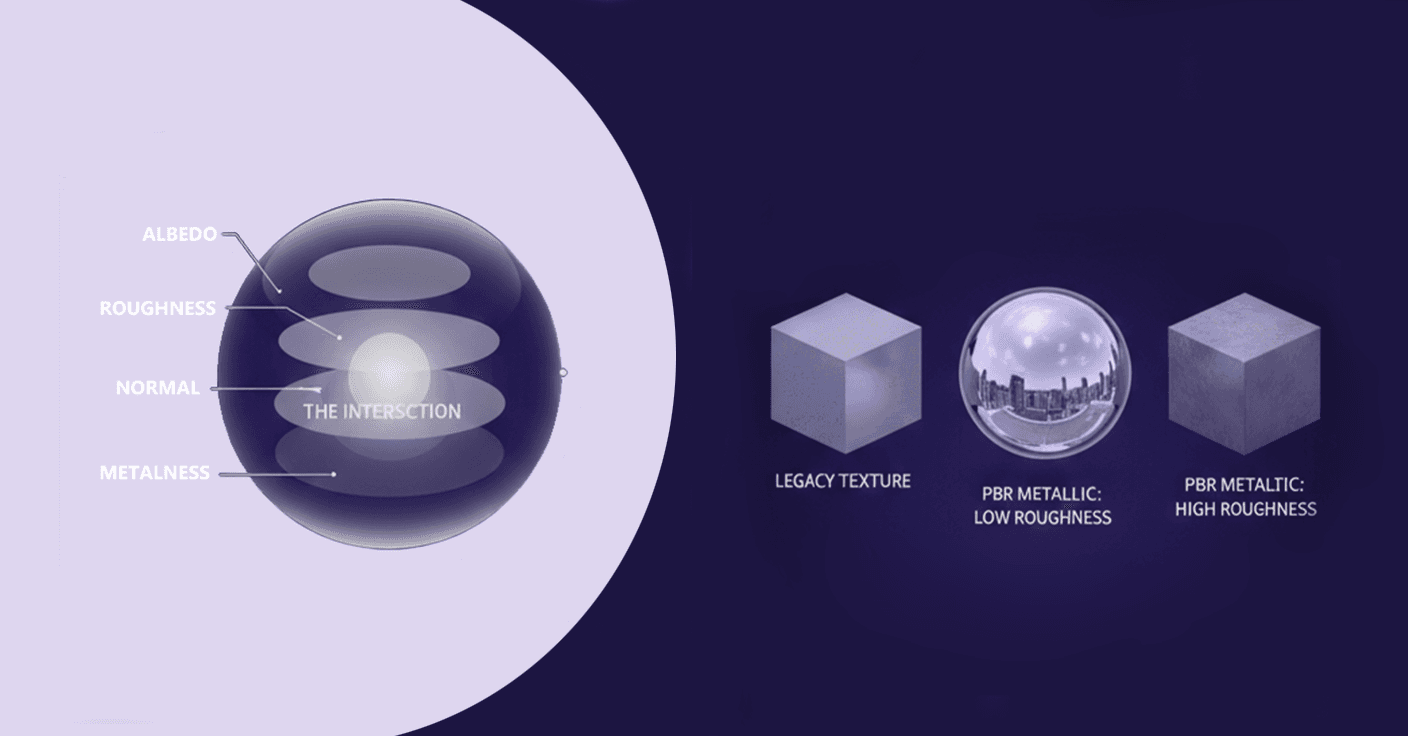
What are PBR metal textures?
Unpacking physically based rendering (PBR)
For years, creating realistic materials was a bit of a dark art. You’d tweak specular highlights and glossiness sliders, cross your fingers, and hope the lighting didn’t expose your material as a fake. It was all guesswork, a process of eyeballing what looked right without any predictable foundation. This approach was not only time-consuming but also wildly inconsistent. A material that looked perfect in one lighting setup would fall apart completely in another.
Physically Based Rendering (PBR) changed all of that. It’s less of a trend and more of a fundamental shift in how we approach computer graphics texturing. Instead of faking it, PBR aims to simulate how light actually behaves in the real world. It’s built on principles of physics, which means materials react to light in a predictable, consistent, and realistic way. You define a material based on its core physical properties, like its color, roughness, and, crucially, its metalness, and the render engine does the heavy lifting of figuring out how it should look. This is why PBR is now the standard in everything from video games to architectural visualization and industrial design. It moves you from an artist's best guess to a reliable, physics-based result.
What exactly is metalness?
So, if PBR is the rulebook, metalness is one of its most important rules. In the world of 3D material properties, metalness (or metallic) is a parameter that defines whether a surface is a metal or a non-metal (also called a dielectric). Think of it as a simple switch. Is this object made of steel, or is it made of plastic? That's the first question metalness answers.
The key distinction comes down to how these two types of surfaces handle light. It’s the defining characteristic that separates a chrome bumper from a painted one.
- Non-metals (Dielectrics): When light hits a non-metal surface like plastic, wood, or ceramic, some of it reflects off the surface as a specular highlight, and the rest is absorbed and scatters underneath the surface before bouncing back out. This subsurface scattering is what gives the object its color. Crucially, the specular highlight itself remains uncolored; it’s just a reflection of the light source. Think of the pure white shine on a billiard ball.
- Metals (Conductors): Metals handle light completely differently. They are conductors, so when light hits a metallic surface, it’s immediately absorbed and re-emitted. None of it scatters underneath. This means two things: first, metals have no diffuse color in the traditional sense. Their color comes entirely from their reflection. Second, the reflected light is tinted with the metal’s color. A gold ring doesn’t have a white highlight; it has a golden one. That colored reflection is the dead giveaway of a metallic surface.
Understanding this core difference is the first step to mastering PBR metal textures. It’s not just an arbitrary setting; it’s a decision that fundamentally changes how a material interacts with every light in your scene.
The metalness workflow: From theory to texture
Understanding the PBR metalness workflow
Knowing the difference between a metal and a non-metal is one thing; telling your software how to render it is another. This is where the metalness workflow, a core component of PBR materials, comes in. It primarily relies on a specific texture map called a metalness map (or metallic map).
Think of a metalness map as a simple, black-and-white mask for your object. It’s a grayscale image where each pixel tells the rendering engine one of two things:
- Black (a value of 0): This area is a non-metal.
- White (a value of 1): This area is a metal.
This leads us to the most important rule of thumb for metalness: most surfaces should be either 0 or 1, with almost nothing in between. Pure materials in the real world are rarely a hybrid of metal and non-metal. An object is either plastic or it’s steel. This binary approach is what keeps your materials physically accurate. A patch of painted metal, for example, would have a metalness value of 0 for the paint layer (non-metal) and a value of 1 for any scratched or chipped areas where the raw metal is exposed. The map provides a clear, decisive instruction for every point on the surface.
Avoid the temptation to use mid-range gray values (like 0.5) for pure surfaces. A material with 50% metalness doesn't really exist in nature and often results in a strange, unnatural look, like plastic with a weird metallic sheen. Stick to the poles, and you’ll be 99% of the way there.
The power duo: How metalness and roughness define a surface
Metalness tells you what a material is, but it doesn't tell you what condition it's in. A brand-new chrome mirror and a sand-blasted aluminum panel are both 100% metal, but they look drastically different. This is where roughness comes into play.
Metalness and roughness are a power duo; they work together to define the final appearance of your surface. If metalness is the on/off switch for a metallic look, roughness controls the quality of that look by defining how sharp or blurry the reflections are. A roughness map is another grayscale texture where:
- Black (a value of 0): Represents a perfectly smooth surface. Light rays bounce off in a uniform direction, creating a sharp, mirror-like reflection.
- White (a value of 1): Represents a very rough, matte surface. Light rays scatter in all directions, creating a blurry, diffused reflection.
Let’s look at a few practical examples of PBR metal textures to see how these two properties work together:
- Polished chrome: This is a classic. You'd use a pure white metalness value (1) and a pure black roughness value (0). The result is a perfect, crisp mirror reflection, tinted only by the subtle base color of chrome.
- Brushed aluminum: Here, you'd still use a white metalness value (1), but you’d introduce a higher roughness value (perhaps 0.4-0.6). You might even use a texture map with subtle streaks to simulate the brushed pattern. The reflections are now soft and stretched, characteristic of that material.
- Matte gold: For something like a matte-finished gold watch, the metalness is still 1, but the roughness value would be even higher (e.g., 0.7-0.8). You can still tell it’s gold from the colored reflection, but the reflection itself is so diffused it’s almost just a sheen.
By controlling just these two parameters, the binary switch of metalness and the grayscale slider of roughness, you can create nearly any metallic surface imaginable. This simple but powerful combination is the engine behind predictable, photorealistic metal materials.
The technical deep dive: Mastering metal shader techniques
How do metal surfaces reflect light in 3D rendering?
We’ve established that metals tint their reflections. But why? The answer lies in the physics of light and surface interaction, which PBR systems are designed to simulate. When a photon of light strikes a conductive (metal) surface, its energy is absorbed by the electrons in the metal. Those electrons are then excited and re-emit a new photon. This process isn't perfect; certain wavelengths of light are more readily absorbed and re-emitted than others, depending on the metal's atomic structure. This selective re-emission is what gives metals their characteristic color.
Gold, for example, is very good at reflecting light in the red and yellow spectrum but absorbs light in the blue spectrum. The result? The light that bounces back to your eye is tinged yellow, creating a golden specular reflection. In metal shader techniques, you typically define this tint using the material's Base Color or Albedo input. For gold, you'd plug in a gold color. For copper, a copper color.
This is in stark contrast to non-metals (dielectrics). When light hits a non-metal, the portion that reflects off the surface does so without changing its color. The specular reflection is a direct, untinted mirror of the light source. A white light shining on a red plastic ball will produce a white highlight, not a red one. The red color of the ball comes from light that entered the surface, scattered around, and then exited, a separate process that metals don't have. This is a fundamental principle in 3D material properties that, once understood, makes material creation far more intuitive.
Metalness rendering across different engines
One of the best things about PBR is that the underlying principles are universal. Whether you're working in V-Ray, Corona, Unreal Engine, or Blender's Cycles, the concepts of metalness and roughness remain the same. However, the exact implementation and terminology can vary slightly, which can trip up even experienced artists.
Here’s a quick look at how to approach metalness rendering in a few common engines:
- Unreal Engine & Unity: These game engines are champions of the Metalness/Roughness workflow. You'll find shader inputs explicitly labeled Metallic and Roughness. You plug your 0-or-1 metalness map into the Metallic slot and your grayscale roughness map into the Roughness slot. It's a very direct translation of the theory.
- V-Ray & Corona: These architectural and product visualization renderers often default to a Specular/Glossiness workflow but fully support the Metalness workflow as well. In modern versions of their standard materials (like VRayMtl), you’ll find a Metalness parameter. Setting it to 1 tells the shader to treat the material as a metal, using the Base Color input for the reflection tint and disabling diffuse scattering.
- Substance Painter & Designer: As industry-standard texturing tools, these are built from the ground up for PBR. When you create a new project, you typically choose a Metallic/Roughness template, and all the channels are set up for you. This makes creating your maps incredibly straightforward.
The key to achieving consistent results is to trust the physics, not just the sliders. Understand that a metalness value of 1 should behave the same way everywhere. If your brushed steel looks different in Unreal than it does in V-Ray, the issue is more likely a mismatch in the lighting, color space (e.g., sRGB vs. Linear), or post-processing, not a fundamental difference in how metalness is calculated.
Common pitfalls in your metalness workflow
Even with a solid understanding, a few common mistakes can derail your PBR metal textures. Here’s what to watch out for:
- The gray metal mistake: The most common pitfall is using in-between metalness values for pure materials. Setting metalness to 0.5 doesn't create a semi-metal. It creates a physically incorrect material that both reflects like a metal and scatters light like a non-metal, resulting in a dark, flat, and unnatural appearance. Rule of thumb: unless you're texturing a surface with a fine blend of metallic dust and dirt, stick to 0 or 1.
- Forgetting to remove the diffuse color: In a proper metalness workflow, when the metalness value is 1, the shader should ignore the diffuse component entirely. However, some older or custom shaders might not do this automatically. For a pure metal, its color comes from its tinted reflection (set by the Base Color map), and it should have no diffuse color at all. Ensure your Base Color for a metal is the color of its reflection, not some other value.
- Making pure metals too dark: The Base Color for common metals should be quite bright. For example, raw iron in RGB terms is often around (195, 198, 201), and polished aluminum is even brighter. Using dark color values for your metals will result in materials that don't reflect enough light and look dull and lifeless. Look up real-world PBR values for common metals as a starting point.
Avoiding these traps will help ensure your materials are not just aesthetically pleasing but also physically plausible, holding up under any lighting condition you throw at them.
Bridging the gap: Why this matters for design leaders
How understanding metal shader properties improves photorealism
At a leadership level, the technical weeds of shader properties might seem distant from the big picture of product design. But they are directly connected. When your team understands and correctly implements metal shader properties, the impact on your digital prototypes is immediate and profound.
It’s the difference between a render that screams “this is a 3D model” and one that gets mistaken for a photograph. Photorealism isn’t about adding more detail; it’s about getting the foundational interactions of light and surface right. Incorrect metalness is one of the fastest ways to break that illusion. A car render with headlights that look like gray plastic instead of chrome immediately signals that the image isn't real, pulling stakeholders out of the experience.
When your digital prototypes look and feel like the real thing, they become powerful decision-making tools. A photorealistic render of a new watch design, with accurately rendered brushed steel and polished gold accents, allows for a much more confident assessment of the product’s aesthetic appeal. This level of realism helps you gain stakeholder buy-in faster and with more enthusiasm because you’re not asking them to imagine what it will look like; you’re showing them.
Accelerating design cycles and ensuring consistency
This commitment to realism has a direct impact on your workflow efficiency. The old cycle of endless tweaking, “Can we make the metal look… more metallic?”, is a huge time sink. It’s born from a lack of a shared, predictable system. When your team adopts a PBR workflow, feedback becomes more precise and actionable. Instead of vague notes, the conversation shifts to Let’s increase the roughness on the aluminum to soften the reflections.
This precision leads to two major benefits:
- Reduced reliance on physical prototypes: High-fidelity digital materials allow you to make critical design decisions earlier in the process. When you can trust that the brushed aluminum in your render will accurately represent the final product, you can iterate dozens of times digitally in the period it would take to create a single physical model. This drastically cuts down on the time and cost associated with prototyping.
- A shared language and asset library: PBR provides a standardized framework for materials that can be shared across departments. The PBR material for Anodized Aluminum 7075, created by the design team, can be passed directly to the engineering team for their simulations or to the marketing team for their launch visuals. This creates a single source of truth for materials, ensuring consistency from the earliest concept to the final advertisement. Building a shared library of pre-approved PBR materials is one of the most effective ways to align your teams and ensure brand consistency across every touchpoint.
From guesswork to ground truth
So, what's the biggest takeaway here? It's that you're no longer just guessing. You're making decisions. The old way was a dance of tweaking sliders and hoping for the best. The PBR metalness workflow gives you a clear, foundational starting point, a ground truth. The only question you have to answer is a simple one: is it metal, or isn't it?
From that single decision, everything else follows.
The next time you or your team approach a material, try this:
- Start with the basics: Don't just grab a preset. Ask those two fundamental questions: Is it metal? And how rough is it?
- Build your source of truth: Create a master file for your most common materials, the brushed aluminum, the polished chrome, and the anodized black. Nail them once, using real-world PBR values as your guide.
- Share the language: That master file becomes your team's shared library. A single source of truth that ensures the material in the first concept render is the same one in the final marketing shot.
This isn't just about making prettier pictures. It's about building confidence in your digital prototypes. It’s about getting faster buy-in from stakeholders because they’re seeing something that looks real, not just “rendered.” It's about swapping endless feedback loops for a workflow that’s predictable, consistent, and grounded in physics.
You’ve got the principles. Now go build something that feels real.

Max Calder
Max Calder is a creative technologist at Texturly. He specializes in material workflows, lighting, and rendering, but what drives him is enhancing creative workflows using technology. Whether he's writing about shader logic or exploring the art behind great textures, Max brings a thoughtful, hands-on perspective shaped by years in the industry. His favorite kind of learning? Collaborative, curious, and always rooted in real-world projects.
Latest Blogs

The Indie Dev Guide to CC0 PBR Textures: Stop Searching, Start Cr...
PBR textures
AI in 3D design

Mira Kapoor
Jul 10, 2026

Sourcing Free Game Textures: Navigating PBR Pipelines and Stylize...
PBR textures
Game textures
Mira Kapoor
Jul 6, 2026

Sculpting with Sunlight: The Architectural Physics of Facade Text...
Texture creation
AI in 3D design

Max Calder
Jul 1, 2026

Accelerate you workflow
with automated PBR texture generation
Enjoy creative freedom with AI powered texture creation
 Texturly
Copyright © 2026 Texturly, Asha Technology Labs Pvt. Ltd. All rights reserved