Implementing Seamless Fabric Texture in 3D: A Guide for Realistic CLO3D Garment Design
By Max Calder | 10 April 2026 | 12 mins read
Table of contents
Table of Contents
In 3D apparel design, textures are not just decorative; they define how a material behaves, reflects light, and communicates realism. You can build a perfectly fitted garment in CLO3D, simulate accurate draping, and fine-tune every pattern detail, but if the fabric texture doesn’t hold up, the entire design can fall apart visually. That subtle “something feels off” moment often comes from one core issue: non-seamless or poorly constructed textures that repeat unnaturally across the garment surface.
These artifacts break immersion instantly, especially in close-up renders or product visualizations. Whether you're designing for virtual showrooms, e-commerce visuals, or real-time environments, your textures need to scale across surfaces without revealing seams. A single fabric texture might be applied across multiple pattern pieces, stretched, rotated, and simulated under different lighting conditions. Without proper tiling, even high-resolution textures can look amateur.
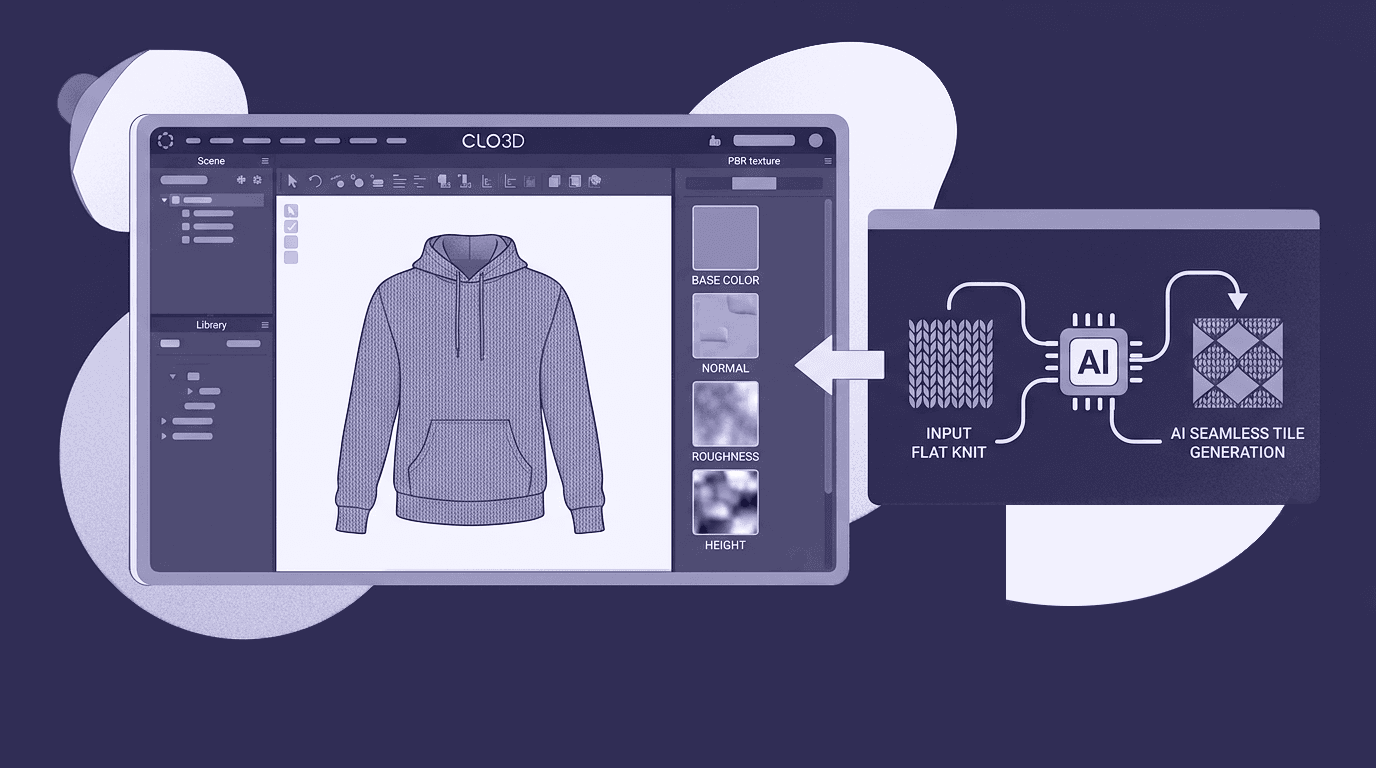
Creating seamless, production-ready fabric textures manually is time-consuming and technically demanding. From fixing edge mismatches to maintaining consistent lighting, the process can slow down even experienced designers. That’s why understanding how to create and implement seamless fabric textures and how to integrate them efficiently into your workflow is essential. It’s the difference between a garment that looks digitally constructed and one that feels convincingly real.
Understanding seamless fabric textures in 3D design
What are seamless tileable textures
A seamless, or tileable, texture is an image that can repeat infinitely across a surface without showing visible edges or breaks. When applied to a garment in a 3D tool like CLO3D, the texture tiles across pattern pieces based on UV coordinates. If the edges of the texture don’t align perfectly, those repetitions become obvious, creating visible seams that instantly reduce realism.
In practice, a seamless fabric texture ensures that no matter how large the garment piece is, or how many times the texture repeats, the surface looks continuous and natural. This is especially important for fabrics like knits, weaves, or prints where repetition is expected, but only if it’s invisible.
Why do seams and repetition break realism in garments
The human eye is extremely sensitive to patterns. When a texture repeats incorrectly, it creates visual artifacts that feel unnatural. You might notice hard edges, mirrored patterns, or abrupt changes in lighting across the garment. These issues become even more pronounced in close-up renders or when the fabric is stretched during simulation.
Another common problem is scale inconsistency. If the texture isn’t designed to tile properly, adjusting its size in CLO3D can exaggerate repetition, making patterns look either too dense or too sparse. This disrupts the perceived material quality and can make even a well-designed garment look synthetic.
Lighting also plays a role. Non-seamless textures often carry baked-in shadows or highlights that don’t match across tiles. When repeated, these inconsistencies create patchy surfaces that react poorly under different lighting setups.
How do textures behave in CLO3D and UV-based workflows
In CLO3D, textures are mapped onto garments using UV coordinates, which define how a 2D image wraps around a 3D surface. Each pattern piece acts as a canvas where the texture is repeated based on its scale and orientation settings. This means your texture isn’t applied just once; it’s repeated across multiple panels, often at different angles. If the texture isn’t truly seamless, these repetitions become highly visible at panel boundaries and along seams.
Additionally, fabric simulation in CLO3D introduces stretching and movement. A poorly constructed texture can distort under these conditions, revealing inconsistencies that weren’t obvious in a flat view.
Understanding this behavior is key. Seamless textures aren’t just a “nice to have”; they are a technical requirement for achieving consistent, realistic results across your entire garment pipeline.
Preparing and creating seamless fabric textures
What makes a high-quality base fabric texture
Everything starts with the base image. Even the most advanced tools can’t fully compensate for a poor-quality input. A strong fabric texture begins with high resolution, even lighting, and minimal distortion. The goal is to capture or source a material in its most neutral, repeatable form.
Ideally, your texture should be photographed or scanned flat, without folds, wrinkles, or harsh shadows. Any directional lighting or visible creases will become exaggerated once the texture is tiled. For fabrics like denim, cotton, or knit, clarity in the weave pattern is essential, as these micro-details define realism in 3D renders.
Consistency is key. A uniform surface ensures that when the texture repeats, it blends naturally without creating visible transitions.
Step-by-step: converting an image into a seamless tileable texture
Creating a seamless texture manually involves aligning edges so that opposite sides of the image match perfectly when repeated. Traditionally, this process requires offsetting the image, identifying visible seams, and blending them using cloning or healing tools.
However, this approach can be time-consuming and technically demanding, especially when working with complex fabric patterns. Even small inconsistencies can result in noticeable repetition artifacts once applied to a garment.
This is where an AI-powered tool like Texturly significantly simplifies the process. Instead of manually correcting edges, you can convert a standard fabric image into a perfectly seamless tileable texture in seconds. The system analyzes the image, removes edge inconsistencies, and ensures that the pattern flows continuously across all sides.
Fixing common issues like lighting, distortion, and edges
Even with a seamless texture, visual consistency matters. Uneven brightness, color shifts, or subtle distortions can still break realism when the texture is repeated.
To address this, designers often need to fine-tune key image properties:
- Brightness and contrast to balance lighting across the surface
- Saturation to maintain accurate fabric color
- Sharpness to enhance weave details without introducing noise
Traditionally, this would require switching between multiple tools, adjusting parameters manually, and rechecking the tiling behavior after each change.
A more efficient approach is to handle these adjustments within the same workflow. Tools like Texturly allow you to not only convert images into seamless textures but also refine them using built-in controls for brightness, contrast, saturation, and sharpness, ensuring the final output is both visually consistent and production-ready.
By streamlining this process, you can move faster from a raw fabric image to a clean, repeatable texture that holds up across different garment designs and lighting conditions.
Generating and using PBR maps for realistic fabric rendering
How PBR maps enhance fabric realism in CLO3D
When applied correctly in CLO3D, PBR maps bring garments to life. For example, a cotton fabric will appear soft and matte due to higher roughness values, while silk will reflect light smoothly, creating a subtle sheen. Similarly, a knit texture gains depth through normal maps, making the weave structure visible even without heavy geometry.
Without PBR maps, garments often look flat and artificial, especially under studio lighting or in close-up renders. With them, you get:
- More accurate light reflection
- Enhanced perception of depth and material thickness
- Realistic shadow interaction across folds and seams
This is particularly important for presentations, lookbooks, and e-commerce visuals where fabric quality directly influences perception.
Streamlining PBR map generation with an AI tool
Traditionally, generating PBR maps required specialized software and a deep understanding of material workflows. Designers had to manually create or derive each map, often using multiple tools and plugins. This not only slowed down the process but also introduced inconsistencies between maps.
AI-powered tools like Texturly simplify this workflow significantly. From a single base image, you can automatically generate a complete set of PBR maps that are aligned and optimized for seamless use. This ensures that all maps work together cohesively, reducing the risk of visual artifacts.
More importantly, combining seamless texture generation with PBR map creation in one pipeline eliminates the need for back-and-forth adjustments. You can go from a raw fabric image to a fully usable 3D material much faster, without compromising on quality.
For a mid-level 3D apparel designer, this means less time spent on technical setup and more time focusing on creative exploration, experimenting with new textiles, refining garment aesthetics, and delivering high-quality outputs efficiently.
Implementing seamless fabric textures in your 3D workflow
Importing textures and applying them to garments
Once your seamless texture and PBR maps are ready, the next step is integrating them into your CLO3D workflow. This is where many designers either unlock realism or unintentionally introduce visual issues.
In CLO3D, fabrics are applied through the Property Editor, where you can assign your base color (diffuse) texture along with additional PBR maps. Start by importing your seamless texture and applying it to the garment fabric. From there, layer in the supporting maps, normal, roughness, and others, to build a complete material.
The key here is alignment. Since CLO3D applies textures across pattern pieces, your seamless texture ensures continuity across seams and panels without visible breaks.
Adjusting scale, tiling, and orientation for accuracy
Even with a perfect, seamless texture, improper scaling can break realism. Fabric textures must match real-world proportions. For example, a knit pattern that appears too large can make the garment look unrealistic, while a pattern that’s too small can lose detail.
CLO3D allows you to control:
- Texture scale (size of the pattern on the garment)
- Rotation/orientation (important for directional fabrics like denim or stripes)
- Tiling behavior across pattern pieces
Fine-tuning these parameters ensures that the fabric behaves consistently across all parts of the garment. Always validate your adjustments in both 2D and 3D views to catch inconsistencies early.
Real-time simulation and material testing
One of CLO3D’s strengths is real-time simulation. As your garment drapes and moves, your texture and PBR maps are tested dynamically under lighting conditions.
This is where seamless textures prove their value. As the fabric stretches or folds, the texture should maintain continuity without revealing repetition or distortion artifacts.
To optimize results:
- Test your garment under multiple lighting setups
- Zoom in to inspect texture behavior in folds and seams
- Adjust roughness and normal intensity for better realism
Optimizing workflow speed with AI
For many designers, the bottleneck isn’t applying textures, it’s preparing them. Switching between tools for tiling, editing, and PBR generation slows down iteration cycles.
Integrating a tool like Texturly into your workflow allows you to:
- Convert raw fabric images into seamless textures instantly
- Generate aligned PBR maps from a single input
- Fine-tune brightness, contrast, saturation, and sharpness before export
This means you can quickly test multiple fabric variations in CLO3D without redoing technical steps each time. For a mid-level designer working on tight timelines, this kind of efficiency directly impacts productivity and creative output.
Instead of spending hours preparing textures, you can focus on refining garments, experimenting with materials, and delivering polished, realistic designs faster.
Elevating your 3D apparel designs with seamless texture workflows
Seamless fabric textures are no longer just a technical enhancement; they are a foundational requirement for producing high-quality 3D garments. From eliminating visible repetition to ensuring consistent material behavior across pattern pieces, they directly impact how realistic and professional your designs appear. When combined with properly generated PBR maps, these textures go beyond surface detail. They define how fabrics interact with light, how depth is perceived, and how materials communicate quality in renders, simulations, and final presentations. For any designer working in CLO3D or similar tools, mastering this workflow is essential to staying competitive.
However, the traditional process of creating seamless textures and generating PBR maps can be time-intensive and fragmented. This is where modern, AI-powered solutions streamline the pipeline, allowing you to move from a base image to a fully production-ready material in a fraction of the time. By integrating tools like Texturly into your workflow, you reduce technical friction and unlock faster experimentation. You can test more fabrics, iterate quickly, and focus on what truly matters: designing innovative, visually compelling garments.
Ultimately, the goal is not just efficiency, but creative freedom. With a robust, seamless texture workflow in place, you gain the flexibility to push boundaries, explore new textile aesthetics, and deliver designs that stand out in both digital and physical fashion landscapes.

Max Calder
Max Calder is a creative technologist at Texturly. He specializes in material workflows, lighting, and rendering, but what drives him is enhancing creative workflows using technology. Whether he's writing about shader logic or exploring the art behind great textures, Max brings a thoughtful, hands-on perspective shaped by years in the industry. His favorite kind of learning? Collaborative, curious, and always rooted in real-world projects.
Latest Blogs

The Indie Dev Guide to CC0 PBR Textures: Stop Searching, Start Cr...
PBR textures
AI in 3D design

Mira Kapoor
Jul 10, 2026

Sourcing Free Game Textures: Navigating PBR Pipelines and Stylize...
PBR textures
Game textures
Mira Kapoor
Jul 6, 2026

Sculpting with Sunlight: The Architectural Physics of Facade Text...
Texture creation
AI in 3D design

Max Calder
Jul 1, 2026

Accelerate you workflow
with automated PBR texture generation
Enjoy creative freedom with AI powered texture creation
 Texturly
Copyright © 2026 Texturly, Asha Technology Labs Pvt. Ltd. All rights reserved