How 3D Artists Create Realistic Textures for Metaverse Worlds
By Max Calder | 23 March 2026 | 14 mins read
Table of contents
Table of Contents
Ever scroll through ArtStation and wonder how the top-tier artists get their environments to feel so real? It often feels like there's some secret sauce, a complex tool, or massive texture library that’s just out of reach for a solo artist. This guide is here to show you that it's not about expensive software, it's about mastering a few core techniques. We're going to break down the essential, budget-friendly methods for creating photorealistic textures, from understanding PBR fundamentals to leveraging the same free tools the pros use. Because in the metaverse, immersion is everything, and great texturing is your secret weapon for making people feel something the moment they step into your world.
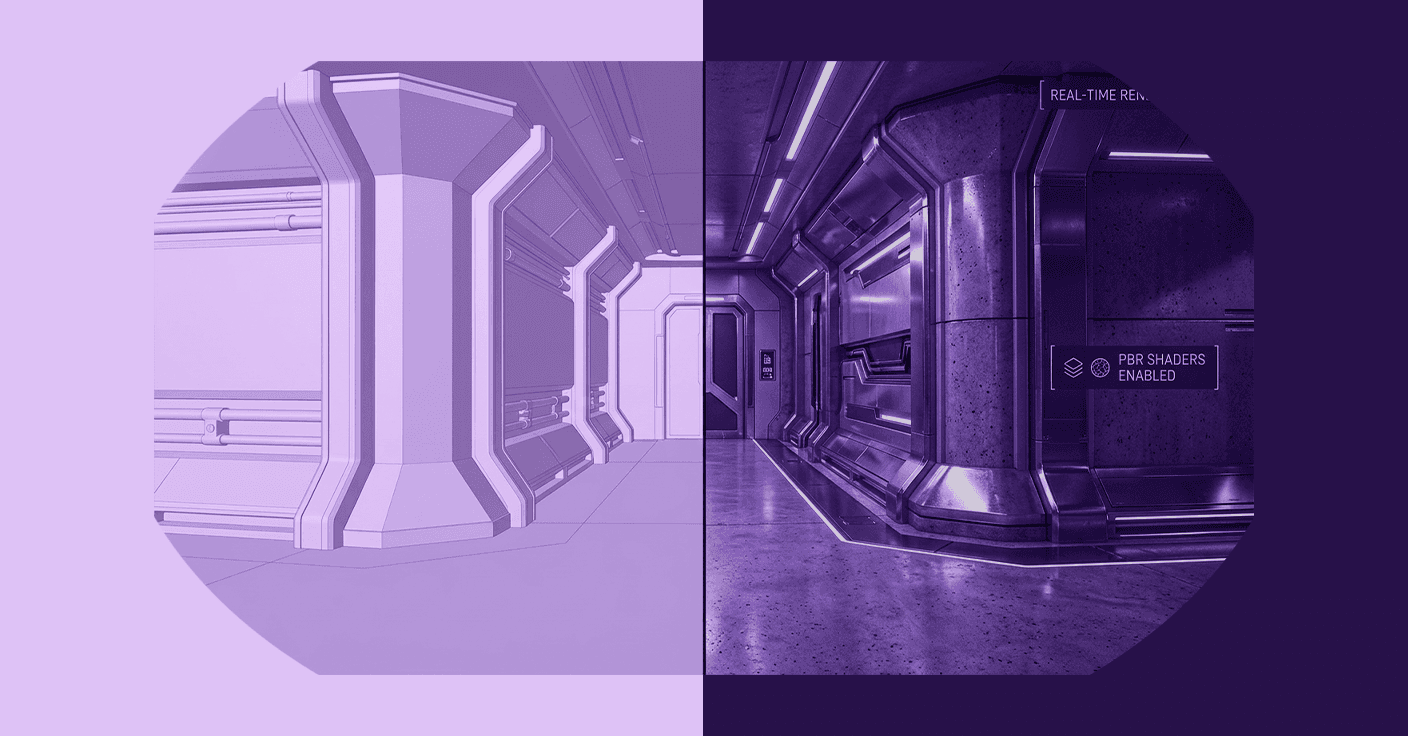
Why textures are your secret weapon
In 3D environments, geometry defines shape, but textures define reality. A simple model can instantly feel believable once the right materials and surface details are applied. In metaverse worlds where immersion is the ultimate goal, textures become one of the most powerful tools artists have. They communicate material properties, age, and atmosphere, transforming plain objects into believable parts of a living environment.
Understand how textures create immersive digital environments
A model without a texture is just a shape. Textures are what breathe life, history, and emotion into a virtual world. They’re the difference between a blocky, uninspired room and a space that feels lived-in and real. Think about it, the subtle scuff marks on a wooden floor, the faint metallic sheen on a worn handrail, the rough, porous surface of a brick wall. These details don't just decorate the geometry; they tell a story and ground the user in the immersive digital environment.
Great texturing guides the eye and sets the mood. A clean, sterile environment with smooth, reflective surfaces might make a player feel uneasy or clinical. On the other hand, a space filled with warm woods, soft fabrics, and a little bit of dust can feel cozy and safe. The geometry could be identical in both scenes, but the textures completely transform the emotional impact. You're not just painting pixels; you're crafting an experience. This is your secret weapon for making people feel something when they step into your world.
Know the difference: Realistic vs. stylized approaches
Before you even open your software, you need to make a key decision: are you aiming for photorealism or a stylized look? There’s no right answer here; it’s about intent.
Photorealism is all about tricking the eye into believing what it sees is real. This is the go-to for architectural visualizations, realistic training simulations, or metaverse experiences aiming to be digital twins of real-world locations. The goal is to replicate reality, imperfections and all. Think of projects that use high-fidelity scans of real objects to create hyper-believable spaces. The challenge here isn't just making it look real, but also ensuring it runs smoothly.
Stylized art, on the other hand, is about conveying a specific aesthetic. It’s an interpretation of reality, not a copy. Think of games like Fortnite or social platforms like VRChat. The textures aren't trying to fool you; they're trying to establish a unique, memorable visual language. A stylized approach can be more forgiving on performance and often ages better than photorealism, which can quickly look dated as technology advances. The choice depends entirely on your project's goals. Are you building a replica of Rome or a funky, neon-drenched clubhouse? Your answer will dictate every texturing decision you make from here on out.
Master the core methods for realistic textures in the metaverse
Creating convincing surfaces in virtual worlds isn’t about guesswork. Professional 3D artists rely on a set of proven techniques that simulate how real-world materials behave. From physically based rendering to procedural generation and photogrammetry, these workflows allow artists to build textures that react naturally to lighting and maintain visual consistency across different environments.
Get to grips with Physically Based Rendering (PBR)
PBR isn't just a buzzword; it's the standard for a reason. It’s a methodology that seeks to simulate how light actually behaves in the real world. When you create PBR textures, you’re not just faking how a material looks; you're defining its physical properties so it reacts believably under any lighting condition. This is the key to achieving virtual world visual realism because it ensures your assets look consistent and correct, whether they're under the harsh midday sun or in a dimly lit room.
There are two main PBR workflows you'll run into:
- Metal/Roughness: This is the most common workflow used in real-time engines like Unreal and Unity. You define a surface with a base color map, a metallic map (which is usually black and white, 1 for pure metal, 0 for non-metal), and a roughness map (which controls how scattered or sharp reflections are). It’s intuitive: you’re essentially telling the engine, This part is metal, this part isn’t, and here’s how rough each surface is.
- Specular/Glossiness: This is an older workflow, but you’ll still see it. Here, you use a specular map to define the color and intensity of reflections and a glossiness map (the inverse of roughness) to control their sharpness. It can offer a bit more control over non-metals but is generally less straightforward for beginners.
The takeaway for you? Focus on mastering the Metal/Roughness workflow. It’s what most metaverse platforms and game engines are built for, and it’s the most direct path to creating assets that look consistently fantastic.
Explore procedural texturing for infinite variations
Painting textures by hand is an art, but it’s slow. Procedural texturing is your force multiplier. Instead of painting pixels, you design a system of nodes and algorithms that generates the texture for you. Think of it like creating a recipe rather than baking the cake yourself. You can change an ingredient at any time, and the whole recipe updates automatically.
This approach has a few massive advantages for a freelance artist:
- It’s non-destructive. Don’t like the scratches? Just tweak the “scratch generator” node. You never have to start over.
- It’s resolution-independent. You can export your texture at 1k, 2k, or 4k without any loss in quality because it's being generated from mathematical rules, not a fixed image.
- It creates infinite variations. Change a single random seed parameter, and you get a completely new version of your texture. This is a lifesaver for creating variety in large environments without doing extra work.
So, where do you start? Blender's Shader Editor is an incredibly powerful and completely free tool for procedural texturing. For those ready to invest, Substance Designer is the undisputed industry standard and a skill that will make your resume stand out.
Use photogrammetry to capture real-world detail
Sometimes, the best way to make something look real is to... well, use something real. Photogrammetry is the process of taking a series of photographs of an object from different angles and using software to reconstruct it into a 3D model with textures. It used to be a complex and expensive process, but today, you can get started with just your smartphone.
A quick guide to get you rolling:
- Pick your subject: Start with something simple, like a rock or a piece of wood. Avoid objects that are transparent, reflective, or have very fine details.
- Shoot your photos: The key is good, diffuse light. An overcast day is perfect because it eliminates harsh shadows. Take at least 30-50 photos, orbiting your object and ensuring each photo has about 60-70% overlap with the previous one. Keep your subject in focus and centered.
- Process it: Use software to stitch the photos together. Free options like Meshroom are powerful, while mobile apps like Polycam make the process incredibly simple.
The resulting model might need some cleanup, but the texture you get will have a level of detail and subtlety that is incredibly difficult to create by hand. It’s one of the fastest ways to inject a dose of reality into your virtual scenes.
Build your budget-friendly texturing workflow
You don’t need expensive software or a massive studio pipeline to create professional-quality textures. Many successful independent artists build efficient workflows using a combination of free tools, affordable software, and open asset libraries. The key is choosing the right tools and organizing a workflow that balances quality, flexibility, and speed.
Choose the right software and tools for the job
As a freelancer, your budget for tools is likely tight. The good news is, you can build a professional-grade texturing pipeline without spending a fortune. In fact, some of the best tools out there are free.
Here’s a breakdown of accessible software that gets the job done:
- Texturly: An AI-powered texture generation platform that helps artists create seamless textures and full PBR material sets automatically. It can generate tileable materials and multiple texture maps, such as base color, roughness, and normal maps, making it useful for quickly building material libraries for large environments.
- Blender: This is your do-it-all powerhouse. You can model, unwrap, and even do texture painting and procedural texturing, all in one place. It's completely free and has a massive community for support.
- Quixel Mixer: Think of this as Photoshop, but for 3D materials. It’s a fantastic tool for blending scanned textures (like the ones from Megascans) to create unique, high-quality materials. It's also 100% free.
- Substance Painter: This is the industry-standard for a reason. Its layer-based painting system and smart materials make texturing incredibly efficient. It's a subscription-based tool, so it’s an investment, but it's one to seriously consider once you start landing bigger client projects.
And don’t forget about asset libraries. You don’t have to create every texture from scratch. Leverage these incredible free resources:
- Quixel Megascans: An enormous library of photorealistic, PBR-ready textures and 3D models. It's free to use with an Epic Games account for any Unreal Engine project, and a subscription gives you access for other uses.
- Poly Haven: A fantastic community-run resource offering high-quality textures, HDRIs, and models, all completely free with a CC0 license. No strings attached.
Learn the art of texture mapping
Nobody loves UV unwrapping. It can feel like a tedious chore standing between you and the fun part. But getting it right is non-negotiable. UV mapping is the process of flattening your 3D model into a 2D map so you can apply a texture to it. Think of it like taking apart a cardboard box and laying it flat.
Here’s how to approach it without the headache:
- Think like a tailor: Your goal is to place seams on your 3D model where they will be least visible. Hide them on the inside of legs, the bottom of objects, or along hard edges where they can be easily concealed.
- Unwrap and arrange: The software will then unfold your model based on these seams into a 2D layout called a UV map. Your job is to arrange these unfolded pieces (UV islands) efficiently within a square space (the 0-1 space) to maximize the use of your texture.
- Focus on what matters: Here's the pro tip: not all parts of your model need the same amount of texture detail. The face of a character needs more resolution than the soles of their shoes. Scale your UV islands accordingly. If a player is never going to see the bottom of a crate, shrink that part of the UV map way down and give that prime real estate to the parts they will see. Smart metaverse texture mapping is all about putting the detail where it counts.
Optimize textures for a smooth metaverse experience
Visual realism is important, but performance is equally critical in interactive environments. Metaverse platforms must run smoothly across a wide range of hardware, from high-end VR systems to mobile devices. This means artists must learn how to balance texture quality with performance by managing resolution, texel density, and efficient asset design.
Balance visual quality with performance
A stunningly detailed 4k texture is useless if it makes the experience run at 10 frames per second. In the metaverse, performance is everything. Your creations need to be accessible to people on a wide range of hardware, from high-end VR rigs to standalone headsets or even mobile phones.
This is where you need to be strategic. A higher-resolution texture isn't always the best choice. The key concept to understand here is texel density. Simply put, it's the amount of texture resolution (pixels) applied to a certain area of a 3D model (meters). Maintaining a consistent texel density across your scene makes the visual quality feel uniform and professional. A hero asset right in front of the player might need a high density (e.g., 1024 pixels per meter), while a small prop in the background can get away with a much lower one (e.g., 256 pixels per meter).
Don't just slap a 4k texture on everything. Analyze your asset. How close will the user get to it? How important is it to the scene? Answering these questions will help you choose the right texture size, saving precious memory and processing power for a smoother experience for everyone.
Use texture baking to fake complex detail
So how do you get that high-end, detailed look without using massive, performance-killing models? The answer is one of the most powerful techniques in 3D art, texture baking.
Baking is the process of transferring surface details from a complex, high-poly model onto a simple, low-poly model that’s optimized for real-time performance. You get the best of both worlds: the stunning visual fidelity of a multi-million-polygon sculpt on a model that’s lean enough to run smoothly in the metaverse.
You'll typically bake several key maps, but these three are the most important:
- Normal Map: This is the magic map. It fakes the lighting information of high-res detail onto your low-poly surface. It’s how you can have intricate bumps, screws, and crevices without adding a single extra polygon.
- Ambient Occlusion (AO): This map adds soft, contact shadows where objects meet or in crevices. It’s a subtle effect that adds a huge amount of depth and realism to your model, making it feel grounded in the world.
- Curvature Map: This map highlights the edges of your model, both convex and concave. It’s incredibly useful for procedurally adding effects like wear and tear, as scratches and scuffs are most likely to appear on exposed edges.
Learning to bake properly is a game-changer. It’s the core workflow used in professional game and virtual world development to create assets that look amazing and run fast.
Add the final polish: Advanced tips for photorealism
Once the core textures are complete, the difference between a good asset and a truly believable one often comes down to subtle details. Imperfections, lighting interaction, and small environmental effects add depth and authenticity to surfaces. These finishing touches help transform technically correct textures into materials that feel natural and lived-in.
How to create photorealistic textures for the metaverse by adding imperfections
Nothing in the real world is perfect. Surfaces get scratched, corners get worn down, dust settles in crevices, and grime builds up over time. It’s these imperfections that sell the illusion of reality. A perfectly clean, uniform texture looks fake and computer-generated. If you want to achieve photorealism, you need to become a storyteller.
Every mark on a surface tells a story about its history and its interaction with the world. When texturing an object, ask yourself:
- Where would it wear down? Think about the parts that are touched most often, like a doorknob or the edge of a table. These areas would be smoother, and the paint might be worn away.
- Where would dirt and dust collect? Dust settles on upward-facing surfaces, while grime and moisture collect in tight crevices and corners.
- How has it been used? A metal hammer will have scratches and dings on its head, while the wooden handle will be darker and smoother where it's been held.
Use layers to build up this history. Start with your base material, then add a subtle layer of dust, some greasy smudges, a few scratches on the edges, and maybe a light leak of rust from a nearby screw. Each layer adds to the narrative and makes the surface feel like it truly belongs in a lived-in world.
Make your textures pop with proper lighting
You can have the best PBR textures in the world, but they'll fall flat without good lighting. PBR materials and lighting are two halves of the same whole. They work together to create a believable image. A rough surface won't look rough if there's no light for it to scatter, and a metallic object won't look like metal if there’s nothing in the environment for it to reflect.
This is why you can't work on your textures in a vacuum. You need to constantly test them under realistic lighting conditions. Here’s a simple but effective tip: create a dedicated lighting test scene in your software of choice. Populate it with a few different High Dynamic Range Images (HDRIs) to simulate various environments:
- A bright, sunny outdoor scene.
- A soft, overcast day.
- A neutral indoor studio lighting setup.
As you work on your material, toggle between these lighting scenarios. Does your wood texture look good in both direct sun and soft indoor light? Does your metal reflect the environment convincingly? If your asset holds up and looks great under multiple lighting conditions, you know you’ve created a robust, realistic material that will shine in any metaverse environment you drop it into.
Your signature on the metaverse
Let's circle back to that secret sauce from the beginning. After all this, it's clear the secret was never about some expensive, gate-kept piece of software. The real secret is a shift in mindset: seeing textures not as a final step, but as the story itself.
The tools we've unpacked, PBR, procedural workflows, and baking, are incredibly powerful. But they're just the brushes. You're the artist.
You now have the technical foundation to stop asking, "How do I make this look real?" and start asking, "What story does this surface tell?" That's the leap that separates a good 3D artist from a great world-builder. It’s the subtle narrative in the scuffs, scratches, and dust that makes a space feel truly alive, and it’s your unique advantage as a focused, independent creator.
So take these techniques and run with them. Build worlds that feel lived-in, create assets with a history, and leave your signature on every surface. You’ve got this.

Max Calder
Max Calder is a creative technologist at Texturly. He specializes in material workflows, lighting, and rendering, but what drives him is enhancing creative workflows using technology. Whether he's writing about shader logic or exploring the art behind great textures, Max brings a thoughtful, hands-on perspective shaped by years in the industry. His favorite kind of learning? Collaborative, curious, and always rooted in real-world projects.
Latest Blogs

The Indie Dev Guide to CC0 PBR Textures: Stop Searching, Start Cr...
PBR textures
AI in 3D design

Mira Kapoor
Jul 10, 2026

Sourcing Free Game Textures: Navigating PBR Pipelines and Stylize...
PBR textures
Game textures
Mira Kapoor
Jul 6, 2026

Sculpting with Sunlight: The Architectural Physics of Facade Text...
Texture creation
AI in 3D design

Max Calder
Jul 1, 2026

Accelerate you workflow
with automated PBR texture generation
Enjoy creative freedom with AI powered texture creation
 Texturly
Copyright © 2026 Texturly, Asha Technology Labs Pvt. Ltd. All rights reserved