Behind the Framework: How We Built an Ethical AI Texture Workflow
By Max Calder | 6 May 2026 | 13 mins read
Table of contents
Table of Contents
AI texture generators feel like a magic button, a promise of infinite materials with zero effort. But push it too often, and you start to notice a problem: your portfolio pieces begin to blend in with everyone else's, and a nagging question about copyright keeps you up at night. This guide is your playbook for navigating that exact problem. We're going to break down how to use AI as a powerful assistant, not a replacement, so you can speed up your workflow while protecting your unique artistic voice and staying on the right side of copyright. This isn’t about ditching powerful tools out of fear; it’s about building a smart, responsible workflow that lets you create better, faster, and with total confidence. Let’s unpack how to get it right.
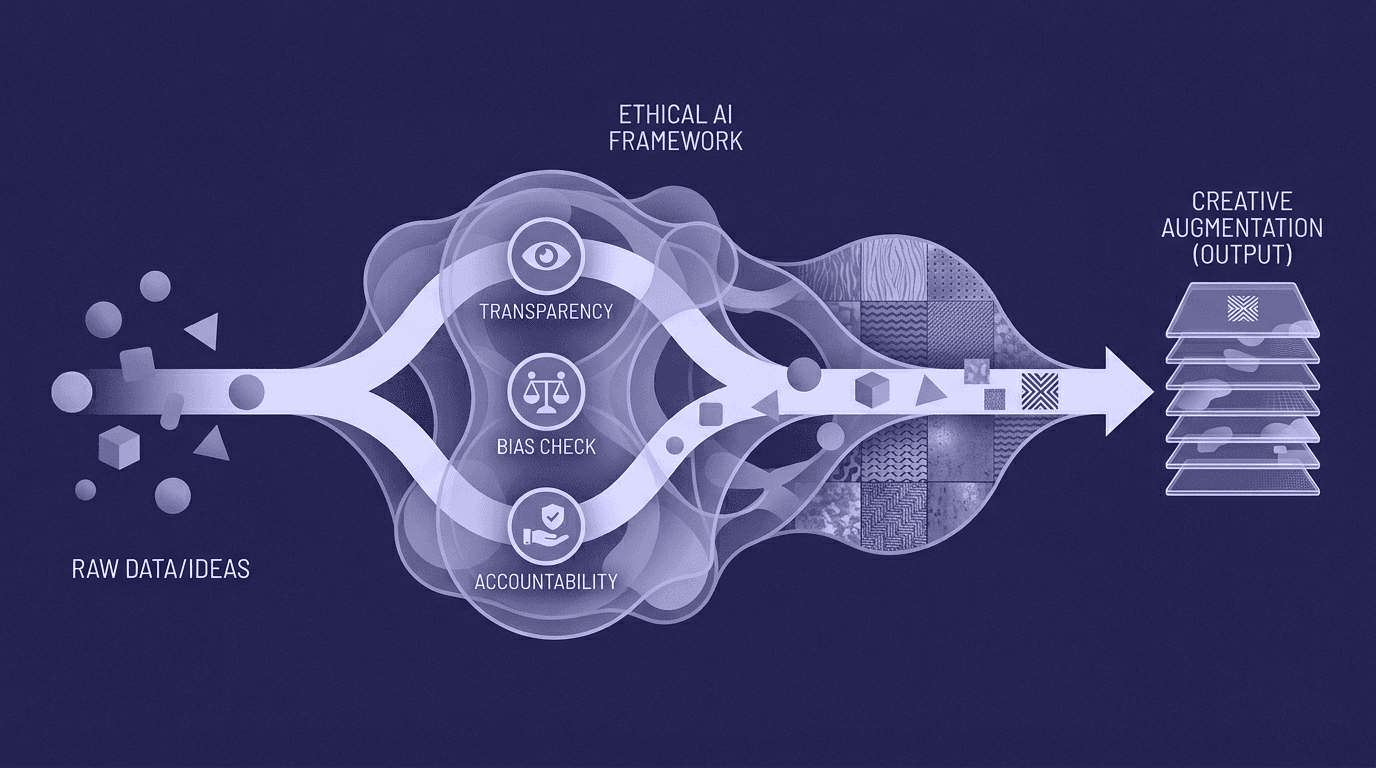
The core dilemma: When speed meets soul
Why ethical AI texture creation is the conversation for designers right now
You’re staring at a massive, untextured environment, and the deadline is looming. The idea of generating a dozen 4K tileable textures in the time it takes to make coffee doesn’t just sound good, it sounds like a lifesaver. That’s the promise of AI texture creation: incredible speed, instant inspiration, and a way to break through creative blocks when you’re just trying to get surfaces covered.
This is the side of AI that’s easy to love. It's a tireless intern that can accelerate look-dev, spitting out hundreds of variations of sci-fi paneling or medieval stone walls. You can iterate on a moodboard in minutes, not days. It's a powerful tool for getting from a blank slate to a workable base.
But here’s the problem, the other side of the coin. When everyone pulls from the same AI well, a strange, stylistic uniformity starts to creep in. The assets look good, but they lack a distinct point of view. They feel generic, missing the specific scuffs, scratches, and stories that make an environment feel lived-in and unique. You risk losing your artistic fingerprint, the very thing that makes your work yours. It’s the difference between a texture that serves a function and one that tells a story. This is the core dilemma: trading your soul for speed. The conversation we need to have isn't about banning the tools, but about learning how to use them without becoming creatively bankrupt.
Protecting your creative voice in an AI-driven workflow
How can designers use AI texture tools ethically without sacrificing originality?
So how do you use these powerful tools without letting them use you? The answer is to treat AI as a collaborator, not a replacement. Think of it as the first 10% of the process, not the final 100%. The fastest way to maintain your creative voice is to use AI for ideation and base layers, not final pixels.
Generate a rough concept for a material. Get a base albedo map that has the general color palette you’re after. But then, you have to take it into your own workshop and get your hands dirty. This is where you reclaim ownership.
Techniques for making it yours: Layering, hand-painting, and procedural adjustments
Your goal is to infuse the generic AI output with intention and narrative. Here’s a practical workflow:
- Generate a base: Instead of a vague prompt, use Texturly to generate a specific, seamless base. For example: “Gritty concrete wall, 4K, tileable, gray, subtle cracks.”
- Refine the Physicality: Don't just settle for the image. Use Texturly’s PBR generation tools to dial in the depth of your Normal maps or the "wetness" of your Roughness maps. This ensures the texture reacts to the lighting in your specific scene.
- Finish in Substance Painter or Blender: Take that modified texture and apply it to your asset. Now, hand-paint the final touches. Add specific edge wear where the object would realistically see friction. Paint a leak running down from a specific pipe. Use vertex painting in Blender to blend this material with a mossy variant, telling the story of which side of the building gets more rain.
By the time you’re done, the AI-generated base is just one small ingredient in a much more complex recipe, your recipe.
Maintaining creative integrity in AI texture workflows
To keep yourself honest, set some personal rules. For example, decide that you’ll only use AI for inorganic surfaces like metal or rock, but always create organic materials like wood or leather from scratch. Or, make a rule that any AI-generated texture must pass through at least three manual modification steps before it can be called “done.”
Case Study: Transforming a Generic AI Texture into a Portfolio-Worthy Asset
Imagine you’re working on a fantasy game and need a stone floor for a mage’s tower. Your prompt, “Ancient stone floor, magical runes, tileable, 4K,” gives you a decent-looking texture with some glowing symbols.
It’s fine, but it’s generic.
Here’s how you make it yours. First, in Substance Designer, you separate the runes from the stone using a color mask. You replace the generic AI runes with your own custom-designed symbols that are relevant to the game's lore. Next, you add procedural cracks that originate from the runes, suggesting magical energy is breaking the stone. Finally, in Blender, you use parallax occlusion mapping to give the stones real depth and create a custom emissive map that makes the runes pulse with light, timed to an in-game event.
Now, the texture isn't just a floor; it's a piece of environmental storytelling. You’ve used AI as a starting block, but the final, portfolio-worthy asset is a testament to your skill and creativity. And that’s how you win. With your creative voice intact, let's untangle the legal knots you'll inevitably face.
Navigating the murky waters of copyright and ownership
Understanding AI-generated textures and copyright law
Alright, let's talk about the part that makes everyone nervous: the law. The biggest issue with AI-generated textures and copyright boils down to one thing: the training data. Most AI image models were trained by scraping billions of images from the internet, many of which are copyrighted. The legal question, which is still being battled out in courts, is whether the AI’s output is a “derivative work.”
Think of it like this: if the AI model generates a texture that is a direct, recognizable copy of an artist's work from its training set, you’re in hot water. While most models are getting better at creating novel outputs, the risk isn't zero. You can't own the copyright to a piece of art that was generated entirely by a machine, and you certainly can't use it commercially if it infringes on someone else's IP.
So what do you do? Read the fine print. The terms of service for the AI tool you're using are your first line of defense. Midjourney, for example, has different terms for its free and paid tiers. Some open-source models like Stable Diffusion give you more freedom, but the responsibility for checking for infringement falls entirely on you. You need to know what the tool you’re using says about commercial rights and ownership before you ever drop one of its textures into a professional project.
Should designers disclose AI-generated textures to clients?
Yes. Full stop. This isn't just about ethics; it's about professionalism and self-preservation. Ethical disclosure of AI-assisted design work builds trust and protects you from future legal headaches. If your client is hit with a copyright claim down the line because of an asset you made, transparency from the start is your best defense.
Most clients won’t care that you used AI, as long as the final work is excellent and legally sound. What they will care about is unforeseen risk. Disclosing your process shows you’re on top of it.
Here are a few simple ways to handle it:
- Layer Naming: Adopt a clear naming convention in your files, like T_MetalPanel_AIbase_Final_01.tga.
- Documentation: Keep a simple text file in your project folder that lists which assets were created with AI assistance and what tools were used.
- Conversation: Mention it briefly during a review. “For the background rock textures, I used an AI-generated base to accelerate the process, then customized it in Substance to fit our art direction.”
It’s that simple. You’re not asking for permission; you’re communicating your professional process. Being upfront turns a potential liability into a mark of a forward-thinking, efficient artist. Now that the legal groundwork is laid, let's build a practical framework to make these decisions easy.
A practical framework for responsible texture design
Best practices for AI texture generation in game design
Navigating responsible texture design with AI tools requires more than good intentions; it requires a system. You need a clear set of guidelines that you can rely on under pressure. Here’s a practical checklist you can use to vet any AI tool before it becomes a staple in your workflow.
A checklist for vetting AI texture tools:
- Data transparency: Does the company tell you where its training data came from? Tools trained on licensed or public domain datasets (like Adobe Firefly) are a much safer bet for commercial work.
- Terms of service: Do you have clear, unambiguous commercial rights to the images you generate? If the language is vague, be wary.
- Artist protection: Does the tool offer features to avoid generating work in the style of a specific living artist? Good platforms are building in safeguards; use them.
- Indemnification: Does the company offer any sort of legal protection or indemnification if a copyright issue arises from your generated assets? This is rare, but a huge plus for enterprise-level tools.
Beyond vetting tools, you need to document your process. In a professional pipeline, you have to be able to track your work. Keep a simple spreadsheet that logs the asset name, the AI tool used, the date, and the prompt. Save the raw AI output before you start modifying it. This paper trail is invaluable if questions about provenance ever come up.
How to build your own ethical frameworks for using generative design tools
Studio policies are catching up, but often you’ll have to be your own ethics committee. Your personal framework for using generative design tools should be built around a series of questions you ask yourself before you type a prompt.
Questions for your ethical framework:
- Why am I using AI for this task? Am I using it to overcome a creative block and spark ideas, or am I using it to skip learning a fundamental skill?
- Is this task creative or just labor? Using AI to generate 50 variations of a generic screw head is smart automation. Using it to generate the key hero asset for a scene might be cutting a creative corner.
- Could I do this myself? The best artists use AI to do things faster, not to do things they can't do. Your skills should always be your foundation.
- Does this align with my studio’s/client’s values? If your studio prides itself on 100% hand-crafted art, using AI might not be the right fit. Always align with the project’s standards.
Building these habits isn't just about playing defense. It’s about consciously deciding what kind of artist you want to be. And in the age of AI, that question is more important than ever, because your role is about to change.
The future-proof artist: Redefining skill in the AI era
How artificial intelligence in texture design is shifting roles
If you’re worried that AI is coming for your job, you’re looking at it the wrong way. Artificial intelligence in texture design isn't an artist replacement; it's a task replacement. It’s automating the repetitive, time-consuming parts of the job, and that’s forcing a shift in what skills are most valuable.
Your role is evolving from a hands-on creator to a sharp-eyed creative director. Your value is no longer measured by how well you can paint a perfect tileable texture from scratch, but by your ability to guide, curate, and refine. You're the one with the vision. The AI is just an incredibly powerful, sometimes frustratingly literal, assistant. Your job is to direct that power.
This means a new set of skills is moving to the forefront:
- Curation & art direction: The ability to sift through a hundred AI-generated options and identify the one that has the right composition, mood, and storytelling potential. Your artistic eye is now more important than ever.
- Prompt engineering: This is the new technical art form. Learning how to talk to the machine, using specific keywords, camera angles, lighting descriptions, and style modifiers, to get the precise output you need, is a crucial skill.
- Technical integration: The know-how to take a generated asset and make it work in a real-time engine. This involves modifying it in tools like Substance Designer, optimizing it for performance in Blender, and ensuring it fits seamlessly into the existing pipeline.
Why AI is a powerful assistant, not a replacement for professional designers
At the end of the day, an AI model doesn't understand why a particular texture works. It can't comprehend the story you're trying to tell or the emotion you want a player to feel when they walk into a room. It can generate a picture of a sad, rainy street, but it doesn't know what it feels like to be there.
That’s your job. The uniquely human skills are now your greatest asset. Storytelling, world-building, emotional resonance, and a cohesive artistic vision, these are the things that AI can't replicate. It can make a thousand different brick textures, but it can’t decide which one tells the story of a war-torn city versus a cozy, welcoming hearth.
You’ve got the eye. AI has the engine. Your creativity isn't being replaced; it's being amplified. Master these new workflows, and you won’t just survive the AI revolution, you’ll lead it.
Your blueprint for the future
The conversation around AI in art is noisy. It’s easy to get lost in the talk about job replacement or the tangled legal headaches. But the path forward isn't about choosing between your craft and the machine. It’s about realizing the machine is just a new, incredibly powerful tool in your belt.
Think of it less as a self-driving car and more as a high-performance engine; it doesn’t decide the destination, but it gives you the power to get there faster. You’re still the one with the map and the hands on the wheel.
You now have a blueprint to use that engine responsibly. You know how to layer your own creativity on top of an AI base, how to ask the right questions about copyright, and how to talk to your clients with confidence. You’re equipped to stop worrying about whether AI will take your job and start using it to do your job better, focusing more on art direction, storytelling, and the big ideas that machines can't replicate.
So go experiment. Break things. Blend AI-generated chaos with your handcrafted details. The future of texture art isn't about who can push the button best; it’s about the artist who has the vision to direct what comes out. You’ve got the vision. Now go build with it.

Max Calder
Max Calder is a creative technologist at Texturly. He specializes in material workflows, lighting, and rendering, but what drives him is enhancing creative workflows using technology. Whether he's writing about shader logic or exploring the art behind great textures, Max brings a thoughtful, hands-on perspective shaped by years in the industry. His favorite kind of learning? Collaborative, curious, and always rooted in real-world projects.
Latest Blogs

The Indie Dev Guide to CC0 PBR Textures: Stop Searching, Start Cr...
PBR textures
AI in 3D design

Mira Kapoor
Jul 10, 2026

Sourcing Free Game Textures: Navigating PBR Pipelines and Stylize...
PBR textures
Game textures
Mira Kapoor
Jul 6, 2026

Sculpting with Sunlight: The Architectural Physics of Facade Text...
Texture creation
AI in 3D design

Max Calder
Jul 1, 2026

Accelerate you workflow
with automated PBR texture generation
Enjoy creative freedom with AI powered texture creation
 Texturly
Copyright © 2026 Texturly, Asha Technology Labs Pvt. Ltd. All rights reserved